Music Assistant 2.7 - Taking over the airwaves
 Marcel van der Veldt
It’s been a busy few months composing behind the scenes, building up to a massive crescendo. Today, the beat finally drops on Music Assistant’s
Of course, you can always update and experience all the great new stuff without reading the rest of this, but you might miss a deep cut. In fact, we can’t even cover everything in this blog (there really is that much), so go sing your praises for anything we missed in the comments!
Table of contents
- Marvin joins the team
- A visual overhaul
- Users and logins
- Remote music streaming
- Introducing Sendspin
- AirPlay additions
- Lyrics support
- Smart fading
- And much more
- Join the audio revolution
“With a Little Help from My Friends”
Marvin joins the team
Music Assistant has gained its first full-time employee at the Open Home Foundation. No, not me! My day job is leading the Ecosystems department
Not to worry, I’m pretty obsessed with my audio setup and will still be tinkering on my little pet project 😁.
“Everything in Its Right Place”
A visual overhaul
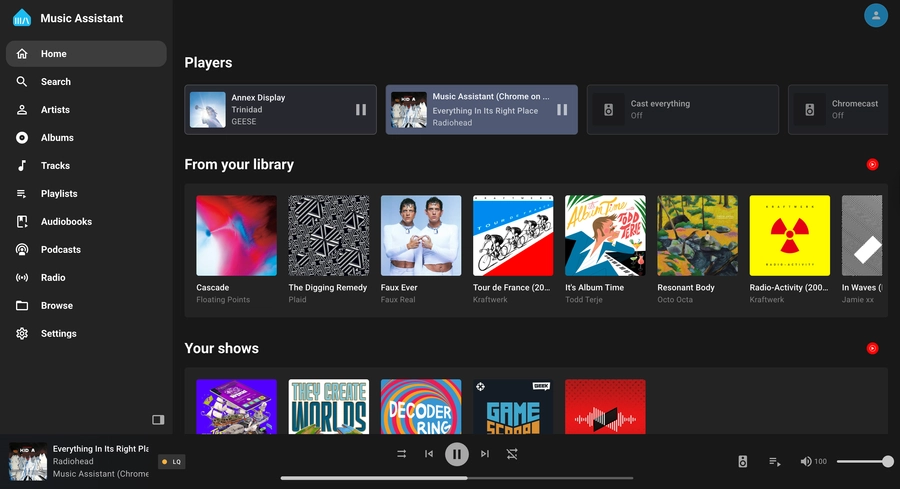 A well deserved visual refresh
Music Assistant joining the foundation has given us a lot more than a nice open home; it’s given the project clearer direction and some expert help. One area some people felt Music Assistant fell short was its UI and UX, and in version 2.7, we’re starting the process of giving it a major overhaul, making it look as good as your music sounds!
This is just the beginning of a big process, so expect every update to bring more polish. The first thing you’ll probably notice is the collapsible navbar on the left of the screen, which looks pretty familiar to another Assistant 😉. Now it’s much more intuitive, especially for new users. The settings page has also been made much easier to navigate with breadcrumbs.
The biggest star of the show is the new Built-in Player, which lets you listen to music on the browser you’re using to hunt for your next track. Great for double-checking if the next song is family-friendly before sending it to every speaker in the home.
“Bulletproof”
Users and logins
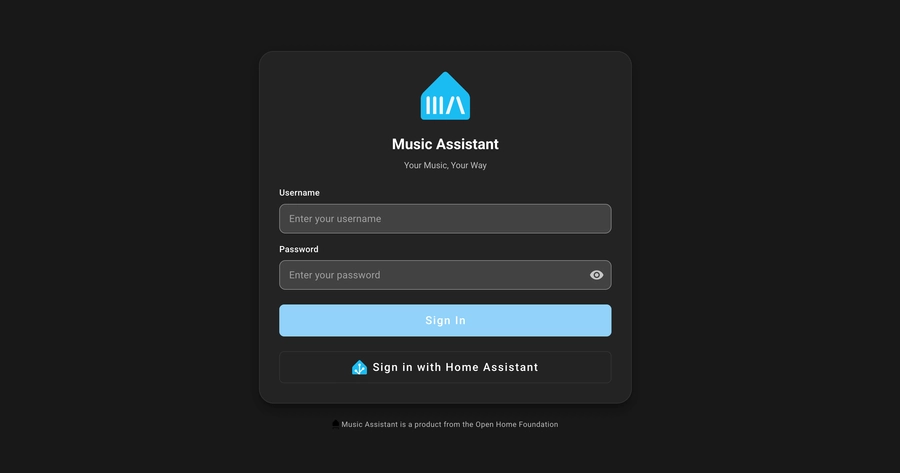 User profiles for the whole family!
A lot of new features we’ve implemented wouldn’t be possible without some form of login and authentication. It was a much-requested feature, as security even within your home shouldn’t be ignored. We know logging in every once in a while can be a minor inconvenience, but we’ve tried to make it as unobtrusive as possible, even implementing a way to use your Home Assistant login as a “Single Sign-On”.
You can now have different user profiles with their own music providers. No more having four Tidal accounts all sitting next to each other, cluttering up the Playlists tab. You can even assign who has access to each speaker; say goodbye to the kids playing Demon Hunters on your office speaker during your performance review 😅. In Settings, just head to the User Management section, where you can add and edit your new users.
“Around the world”
Remote music streaming
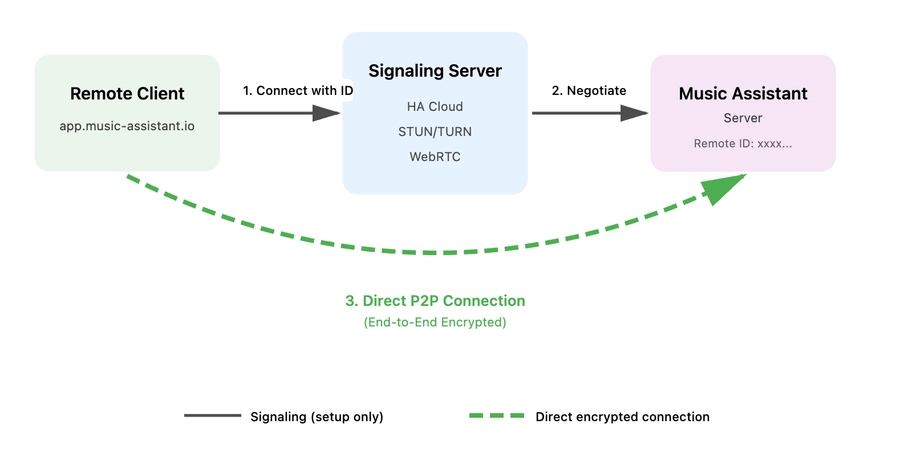 No matter where, no matter when
One feature made possible with our new login interface is remote music streaming – yes, that’s correct, Music Assistant anywhere you can connect to the internet. We’ve created a new web app
It uses Home Assistant Cloud’s built-in multimedia streaming capabilities (WebRTC) to help route the audio from your Music Assistant server to wherever you are. A Home Assistant Cloud subscription is not required to use this feature; a big shoutout to Nabu Casa for providing their infrastructure for free to our users. Home Assistant Cloud subscribers get access to even more powerful routing, which improves streaming in more places. This subscription also supports the full-time development of Music Assistant 🙏.
This connection is peer-to-peer and end-to-end encrypted, meaning no one will know if you’re listening to ABBA 😊. I wouldn’t say it’s ready to replace your current music streaming service, but it’s a great way to get your FLACs playing at a friend’s house. You could even open two instances of the web app and stream it to two devices, and they’ll be synchronized… but how is that even possible?
“Spin me right round”
Introducing Sendspin
For some time, the Music Assistant team has been looking for the best way to stream audio, album art, and other music visualizations to the devices we have around our homes. There are a couple of projects out there doing cool stuff with streaming audio, but not any that fit our needs. So, when it doesn’t exist, it’s time to start building.
Introducing Sendspin, a new multimedia streaming and synchronizing protocol. It’s fully open source and free to use. Sendspin can stream high-fidelity audio, album art, and visualizer data, automatically adapting to each device’s capabilities. Imagine an e-paper display showcasing the album cover, while multiple speakers play in sync, and smart lights pulse to the rhythm.
The best way to use it right now is either via your browser or a Home Assistant Voice Preview Edition running beta firmware. We’ve built the experimental ability to use Sendspin on Google Cast-capable speakers (we’re also looking to do the same with AirPlay-capable speakers), which will allow Sendspin to work with a lot of different hardware.
A big thanks to Maxim
All the best things in life are meant to be shared, and your music should be as free and open as the software we love. So spin that record 💿, drop the needle, and send that music across your entire home.
“Aeroplane”
AirPlay additions
We recently added support for external audio sources, the first being Spotify Connect. This allows you to stream audio from the Spotify app to your Music Assistant server, which could send it across all your speakers, even if they don’t support Spotify Connect. We’ve now added the ability to send AirPlay audio to Music Assistant, which you can then send anywhere in your home.
We also now support AirPlay 2 speakers as a player provider, which means perfectly synced audio across all your AirPlay 2-capable speakers, like HomePods. We recommend reading the limitations in the documentation, as not all AirPlay 2 devices are made equal 🤦♂️.
“Sing”
Lyrics support
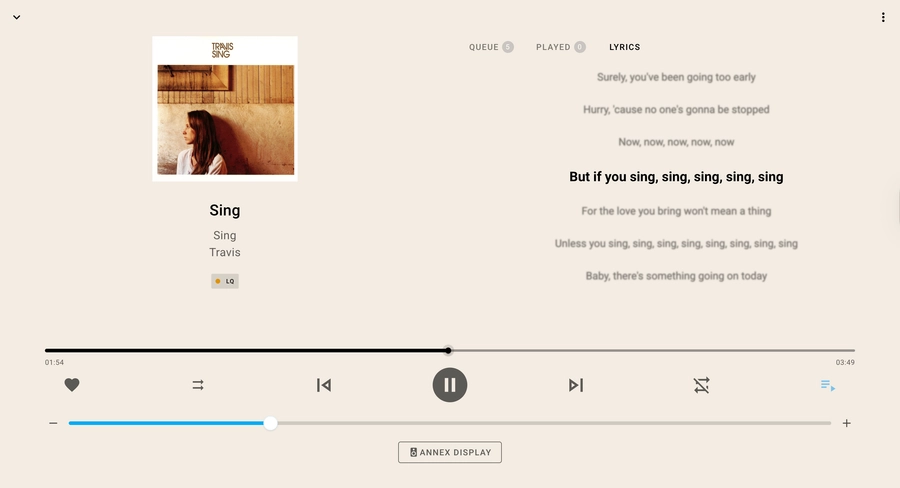 It's time for karaoke!
Never again be left guessing what Kurt is saying in Smells Like Teen Spirit. As of Music Assistant 2.6, you can now see the lyrics of the song you’re playing. If the lyrics provider supports it, there is the ability to have these words time-synced, making it more like karaoke. Lyrics can be found when you open the queue menu and it will be in the “lyrics” tab (this tab will only appear if the track name, artist and album are matched to the lyrics providers). We started with support of LRCLIB, but have since added Tidal lyric syncing, Genius lyrics, and local LRC files.
“Smooth operator”
Smart fading
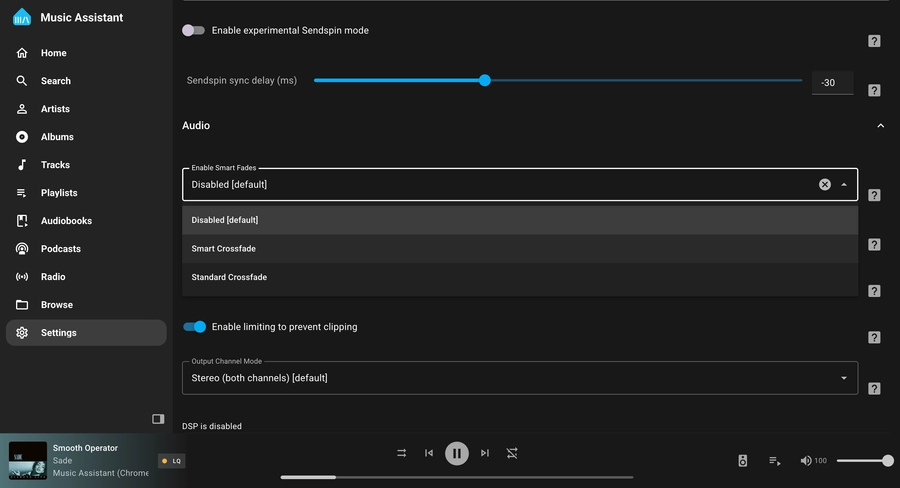 Making your playlists seamless
Music Assistant is now your personal in-house DJ, perfectly blending one song into the next, and unlike a DJ it always takes your requests 😎. This latest update adds Smart fading, which takes into account the BPM of each song, to make crossfading between songs sound more natural. To turn it on, go to your player of choice, scroll down to the Audio section, and choose “Enable Smart Fades”.
“All the small things”
And much more
None of these updates are small things, but I’m running out of space, so here is the rest of the hot 100:
- There are now DSP presets that allow you to quickly save and apply custom configurations.
- Track and share your listening history, with the addition of scrobbling, with support for LastFM, ListenBrainz, and Subsonic.
- Several new player providers have been added, including Yamaha MusicCast, and Roku devices running Media Assistant.
- Added VBAN as a new input provider.
- New radio and podcast providers include Radio Paradise, Podcast Index, BBC Sounds, gPodder, iTunes Podcasts, Dl.fm, and ARD Audiothek.
- Can’t follow Phish on tour? Luckily, the new Phish.in provider has you covered. There’s also Nugs.net if you’re looking for more live music.
- Another cool hodgepodge of audio is the Internet Archive, which can now be added as a provider.
- One of Japan’s biggest streaming platforms Niconico has been added as an audio provider ㊗️.
“Rebel yell”
Join the audio revolution
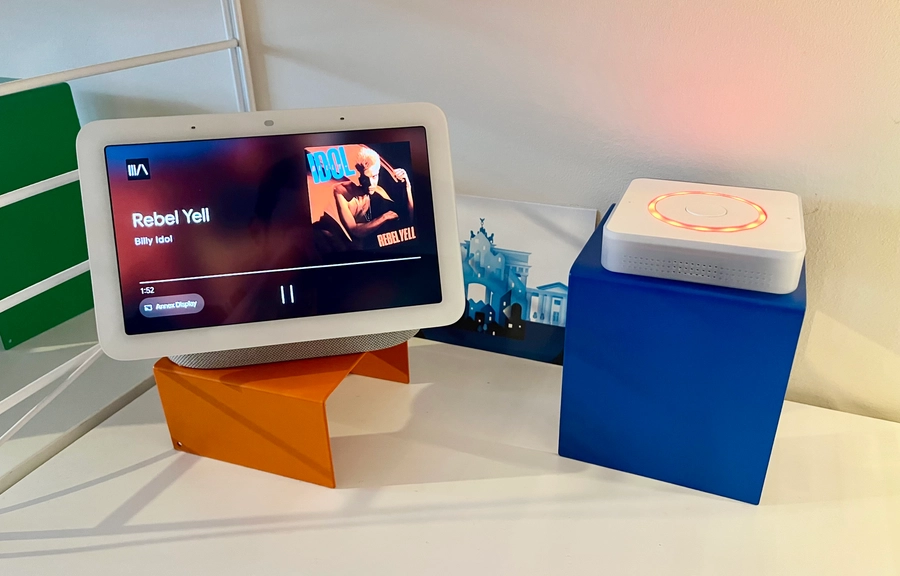 Music Assistant is also cast compatible!
Your music, your players – it’s time to take back control of your music and the devices you want to play it on. If you’re new to Music Assistant, check how to get started here