NINA
The NINA integrationIntegrations connect and integrate Home Assistant with your devices, services, and more. [Learn more] displays warnings from the Bundesamt für Bevölkerungsschutz und Katastrophenhilfe in Germany.
For each county/city it creates warning slots that change to Unsafe when warnings are present. The details of the warning are provided in separate entities.
Use case: Make your home react to official warnings. For example, you can turn off your ventilation system to help prevent smoke from entering your home when a fire is reported, or close the skylights when a storm is expected.
Configuration
To add the NINA service to your Home Assistant instance, use this My button:

If the above My button doesn’t work, you can also perform the following steps manually:
-
Browse to your Home Assistant instance.
-
In the bottom right corner, select the
Add Integration button. -
From the list, select NINA.
-
Follow the instructions on screen to complete the setup.
Whitelist regex to filter warnings based on affected areas. For details see below.
Options
To define options for NINA, follow these steps:
-
In Home Assistant, go to Settings > Devices & services.
-
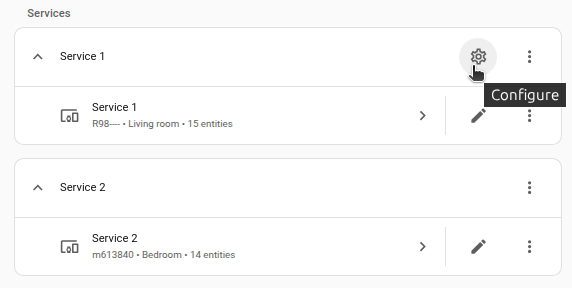
If multiple instances of NINA are configured, choose the instance you want to configure.
-
On the card, select the cogwheel
. - If the card does not have a cogwheel, the integration does not support options for this service.
-
Edit the options, then select Submit to save the changes.
Whitelist regex to filter warnings based on affected areas. For details see below.
Filter
The integration includes the possibility to filter warnings in two ways via a regex.
All filters are applied to lowercase text only.
Headline blocklist
This blocklist filters warnings based on the headline. In other words, if the regular expression matches the headline of the warning, the warning will be ignored.
Default: Match nothing (/(?!)/)
Example
Ignore warnings that contain the word corona
Regex: .*corona.*
Headline: corona-verordnung des landes: warnstufe durch landesgesundheitsamt ausgerufen
Affected area filter
This filter whitelists warnings based on the affected area. In other words, if the regular expression matches the area, the warning will be displayed.
Default: Match all (.*)
Example
Show only warnings from the city of nagold.
Regex: .*nagold.*
Areas: gemeinde oberreichenbach, gemeinde neuweiler, stadt nagold
Supported functionality
This integration provides the following entities for each warning slot.
Sensors
-
Affected areas:
- Description: Areas affected by the warning.
-
Remarks: Shortened to 250 chars. To get all areas please use the
nina.get_affected_areasaction.
-
Expires:
- Description: Expiration timestamp of the warning.
-
Headline:
- Description: Headline of the warning.
-
More information URL:
- Description: URL with further information about the warning.
-
Sender:
- Description: Sender of the warning.
-
Sent:
- Description: Transmission timestamp of the warning.
-
Severity:
- Description: Severity of the warning.
- Options: Extreme, Severe, Moderate, Minor, Unknown
-
Start:
- Description: Starting timestamp of the warning.
Binary sensors
-
Warning:
- Description: Presence of a warning.
- Attributes: Available attributes are listed below.
Attributes
The following attributes are available for the warnings.
-
Attributes:
-
id: Individual ID for each warning.
-
Actions
The integration provides the following actions.
Action: Get warning details
The nina.get_details action is used to fetch all details of a warning.
-
Target: NINA binary sensor entity
- Description: The NINA warning binary sensor to get the recommended actions for.
- Optional: No
Response data
The response data is an object containing all the warning data. Returns null when no warning is active.
{
  {
  "binary_sensor.bad_ditzenbach_goppingen_baden_wurttemberg_warning_1": {
    "headline": "Amtliche WARNUNG vor extremer HITZE",
    "description": "Am Freitag wird eine extreme Wärmebelastung bis zu einer Höhe von 400m erwartet.<br/><br/>Am Samstag wird eine extreme Wärmebelastung bis zu einer Höhe von 600m erwartet.<br/><br/>Heute ist der 9. Tag der Warnsituation in Folge.",
    "sender": "Zentrum für Medizin-Meteorologische Forschung",
    "severity": "Severe",
    "recommended_actions": "Hitzebelastung kann für den menschlichen Körper gefährlich werden und zu einer Vielzahl von gesundheitlichen Problemen führen. Vermeiden Sie nach Möglichkeit die Hitze, trinken Sie ausreichend Wasser und halten Sie die Innenräume kühl.",
    "affected_areas": "Gemeinde Oberreichenbach, Gemeinde Neuweiler, Gemeinde Simmersfeld, Gemeinde Simmozheim, Gemeinde Rohrdorf, Gemeinde Ostelsheim, Gemeinde Egenhausen, Gemeinde Dobel, Gemeinde Schopfloch, Stadt Haiterbach, Gemeinde Gechingen, Gemeinde Wörnersberg, Gemeinde Enzklösterle, Gemeinde Seewald, Gemeinde Waldachtal, Stadt Bonndorf im Schwarzwald, Stadt Engen, Gemeinde Eigeltingen, Mitgliedsgemeinde in Verwaltungsgemeinschaft Pfofeld, Stadt Pappenheim und 229 weitere.",
    "web": "https://dwd.de/warnungen",
    "id": "dwd.2.49.0.0.276.0.DWD.PVW.1782460800000.559ba8f2-38a1-484f-b6e7-1424f85d1441.MUL",
    "sent": "2026-06-26T09:59:50+02:00",
    "start": "2026-06-26T10:00:00+02:00",
    "expires": "2026-06-27T19:00:00+02:00"
  }
}
Examples
Example usage
alias: "Notify on NINA warning with full affected areas"
description: "When a NINA warning becomes active, fetch the full list of affected areas and send a notification."
triggers:
  - trigger: state
    entity_id: binary_sensor.nina_warning_1
    to: "on"
actions:
  - action: nina.get_details
    target:
      entity_id: binary_sensor.nina_warning_1
    response_variable: warning_data
  - action: notify.mobile_app
    data:
      title: "NINA warning active"
      message: "Affected areas: {{ warning_data['binary_sensor.nina_warning_1']['affected_areas'] }}"
Data updates
The integration checks for warnings every 5 minutes.
Removing the integration
This integration follows standard integration removal. No extra steps are required.
To remove an integration instance from Home Assistant
- Go to Settings > Devices & services and select the integration card.
- From the list of devices, select the integration instance you want to remove.
- Next to the entry, select the three dots
menu. Then, select Delete.