

OSRAM Infrared
The OSRAM Infrared integrationIntegrations connect and integrate Home Assistant with your devices, services, and more. [Learn more] lets you control compatible OSRAM and LEDVANCE RGB lights using an infrared emitter previously configured in Home Assistant.
You can optionally select an infrared receiver during setup. When the receiver captures a supported command from the physical remote, the integration updates the light entity to reflect the remote’s command. For example, pressing the off button on the physical remote updates the light entity to off in Home Assistant.
Because infrared is a one-way signal, Home Assistant cannot confirm whether the light received a command. The state shown in Home Assistant reflects the last sent value, not a confirmed reading from the light.
Supported devices
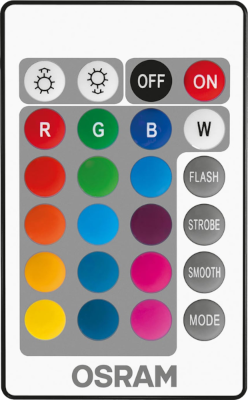
The integration supports OSRAM and LEDVANCE RGB lights that use the supported infrared remote command set. The supported remote has 24 buttons and includes controls for power, brightness, preset colors and effects and a mode button.
Prerequisites
Before setting up the OSRAM Infrared integration, you need a working infrared emitter already set up in Home Assistant. The emitter must expose an Infrared entity and be positioned so that its infrared LED can reach the light.
You can optionally set up an infrared receiver. The receiver must also expose an Infrared entity and be positioned so that it can capture commands from the physical remote. A receiver improves state tracking when the physical remote is used, but it is not required to control the light from Home Assistant.
For example, you can use an ESPHome device with an infrared LED for sending commands and an infrared receiver module for capturing commands from the physical remote.
Configuration
To add the OSRAM Infrared device to your Home Assistant instance, use this My button:

If the above My button doesn’t work, you can also perform the following steps manually:
-
Browse to your Home Assistant instance.
-
In the bottom right corner, select the
Add Integration button. -
From the list, select OSRAM Infrared.
-
Follow the instructions on screen to complete the setup.
The infrared emitter entity used to send commands to the OSRAM or LEDVANCE light. This must be an entity provided by a hardware integration, such as ESPHome, that has already been set up with an infrared emitter.
Supported functionality
Light
The integration creates a light entity with the following functionality:
- Turn the light on and off.
- Select a color from the color wheel. The requested color is mapped to the closest supported preset of the physical remote.
- Select the Flash, Strobe, or Smooth effect.
Data updates
The integration does not pollData polling is the process of querying a device or service at regular intervals to check for updates or retrieve data. By defining a custom polling interval, you can control how frequently your system checks for new data, which can help optimize performance and reduce unnecessary network traffic. [Learn more] the light. After sending a command, it updates the light entity to reflect the expected result.
If you configure an infrared receiver, the integration also updates the assumed state when the receiver captures a supported command from the physical remote. Signals that do not match the supported OSRAM infrared protocol are ignored.
Known limitations
- Infrared communication does not provide confirmation that the light received a transmitted command. The reported state can differ from the actual state if a signal is missed.
- Brightness control is currently not supported.
- The color wheel maps colors to the discrete presets available on the physical remote. The selected color can therefore differ slightly from the requested color.
- Commands sent with the physical remote update the Home Assistant state only when an infrared receiver is configured and successfully captures the signal.
Troubleshooting
The integration cannot be set up
Make sure that an infrared emitter entity is already available in Home Assistant. The emitter is required during setup.
The light does not react to commands
Make sure that the infrared emitter is positioned within range and pointed toward the light. If the emitter is unavailable, verify the hardware integration that provides the infrared entity.
Commands from the physical remote do not update the light state
Make sure that you selected an infrared receiver during setup and that the receiver is positioned so that it can capture signals from the physical remote.
Removing the integration
This integration follows standard integration removal.
To remove an integration instance from Home Assistant
- Go to Settings > Devices & services and select the integration card.
- Next to the entry you want to remove, select the three dots
menu. Then, select Delete. - Depending on the integration, the entries are listed under one of the following headings:
- Devices
- Hubs
- Services
- Integration entries
- Depending on the integration, the entries are listed under one of the following headings:
- To confirm, select Delete.
- Home Assistant also deletes the devices and entities of the entry.
- If Home Assistant asks you to restart, restart Home Assistant.
- If Home Assistant asks whether to also delete the application credentials, select Remove or Keep.
- If you keep them, Home Assistant uses them automatically when you add the integration again.
- To delete them later, refer to Deleting application credentials.