

Radio frequency
The Radio Frequency integrationIntegrations connect and integrate Home Assistant with your devices, services, and more. [Learn more] allows you to use Home Assistant to send commands to radio frequency-controlled devices, or to receive signals from radio frequency remotes. The integration acts as an abstraction layer between the following components:
- A radio frequency remote adapter (proxy) hardware
- An integration that provides radio frequency entities by integrating a radio frequency remote adapter (such as ESPHome or Broadlink)
- Device-specific integrations (such as Honeywell String Lights or Novy Cooker Hood)
This page documents the Radio Frequency integration. To learn more about radio frequency control in Home Assistant, refer to Radio frequency.
You can control radio frequency-controlled devices from Home Assistant without touching the handheld remote control. Home Assistant can also receive signals from a handheld RF remote. The chart illustrates how this is possible via the integrations.
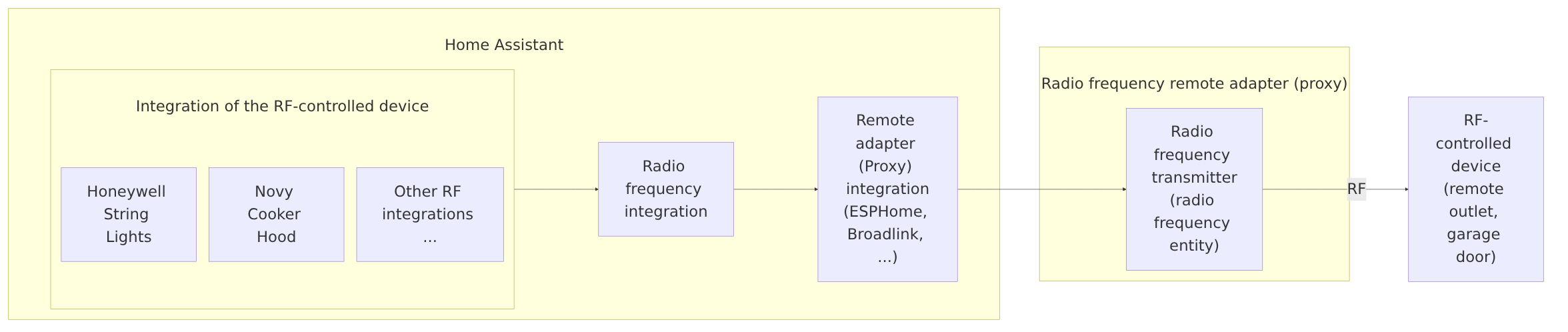 How the Radio Frequency integration connects device integrations to a radio frequency remote adapter through a remote adapter integration.
A radio frequency entityAn entity represents a sensor, actor, or function in Home Assistant. Entities are used to monitor physical properties or to control other entities. An entity is usually part of a device or a service. [Learn more] represents either a radio frequency transmitter or a radio frequency receiver.
Building block integration
This radio frequency is a building block integration that cannot be added to your Home Assistant directly but is used and provided by other integrations.
A building block integration differs from the typical integration that connects to a device or service. Instead, other integrations that do integrate a device or service into Home Assistant use this radio frequency building block to provide entities, services, and other functionality that you can use in your automations or dashboards.
If one of your integrations features this building block, this page documents the functionality the radio frequency building block offers.
Radio frequency states
A radio frequency entity has no on or off state. Its stateThe state holds the information of interest of an entity, for example, if a light is on or off. Each entity has exactly one state and the state only holds one value at a time. However, entities can store attributes related to that state such as brightness, color, or a unit of measurement. [Learn more] is a timestamp showing when the entityAn entity represents a sensor, actor, or function in Home Assistant. Entities are used to monitor physical properties or to control other entities. An entity is usually part of a device or a service. [Learn more] was last active:
- For a transmitter, the state is the date and time the last RF command was sent.
- For a receiver, the state is the date and time the last RF signal was received.
Home Assistant stores the timestamp in UTC, for example, 2026-01-01T12:00:00.123+00:00. The Home Assistant interface shows it in your local date and time format.
In addition, the entity can have the following states. Each item shows the interface label, followed by the stored state:
-
Unavailable (
unavailable): The entity is currently unavailable. -
Unknown (
unknown): The state is not yet known.
Because the stateThe state holds the information of interest of an entity, for example, if a light is on or off. Each entity has exactly one state and the state only holds one value at a time. However, entities can store attributes related to that state such as brightness, color, or a unit of measurement. [Learn more] of a radio frequency entity is a timestamp, it changes every time the entity is used. This means you can use it to track when the transmitter last sent a command, or when the receiver last picked up a signal. For a transmitter, Activity can also show which integrationIntegrations connect and integrate Home Assistant with your devices, services, and more. [Learn more] or actionAn action makes Home Assistant do something, for example, turn on a light, send a notification, or activate a scene. Automations and scripts run a list of actions. [Learn more] triggered the transmission.
Device class
The device class tells Home Assistant whether a radio frequency entity is a transmitter or a receiver. Home Assistant uses the device class to choose the icon and the default name.
Home Assistant sets the device class automatically, based on whether the entity sends or receives RF signals. You can’t change the device class.
Device classes in automations and templates
- Automations: The device class doesn’t change how a radio frequency entity works in automations.
- Templates: The device class is the
device_classattribute of the entity. Use the stored value, such astransmitter. For example, you can find entities by device class.
List of available device classes
Each item shows the name you see in the Home Assistant interface, followed by the device class as Home Assistant stores it.
-
Radio frequency transmitter (
transmitter): Sends RF signals to a radio frequency-controlled device. -
Radio frequency receiver (
receiver): Receives RF signals, for example from a handheld remote.