2026.1: Home is where the dashboard is 🥂
 Franck Nijhof
Happy New Year! 🥂
I hope you had a wonderful holiday, spending time with your loved ones. We’re kicking off 2026 with a smaller release, as our contributors and maintainers have been enjoying some well-deserved time off as well. But don’t worry, there’s still plenty of good stuff in this release!
Home Assistant 2026.1 brings a refreshed Home dashboard experience on mobile, with summary cards right at your fingertips without extra taps. We’ve also made it easier than ever to navigate to the protocol connecting your devices, such as Zigbee, Z-Wave, Thread and more.
For automation enthusiasts, we’re continuing our work on our even more “human-friendly” triggers, which can be enabled via Home Assistant Labs, so you can build automations using easy-to-understand language instead of technical state changes, like initiating automations if a button is pressed or someone arrives home.
On the integrations front, we welcome eight new integrations to the family, including pet tracking with Fressnapf, energy monitoring with eGauge, and smart heating control with Watts Vision +. Plus, improvements to existing integrations from our amazing community contributors.
I wish you a happy and healthy 2026! Enjoy the release!
../Frenck
- Home dashboard improvements
- Purpose-specific triggers and conditions progress
- Easier navigation to protocol dashboards
- Integrations
- Other noteworthy changes
- Patch releases
- Need help? Join the community
- Backward-incompatible changes
- All changes
A huge thank you to all the contributors who made this release possible! And a special shout-out to @bramkragten
Home dashboard improvements
The Home dashboard continues to evolve! In the previous release, we introduced a brand-new sidebar layout, weather tiles, and energy distribution summaries. This release takes it even further with a streamlined mobile experience and better device management.
Streamlined mobile navigation
On mobile devices, the Home dashboard now displays summary cards (like lights, climate, security, media players, weather, and energy) directly at the top of the view, followed by your favorites and areas. This replaces the previous tab-based navigation, giving you instant access to everything that matters without any extra taps.
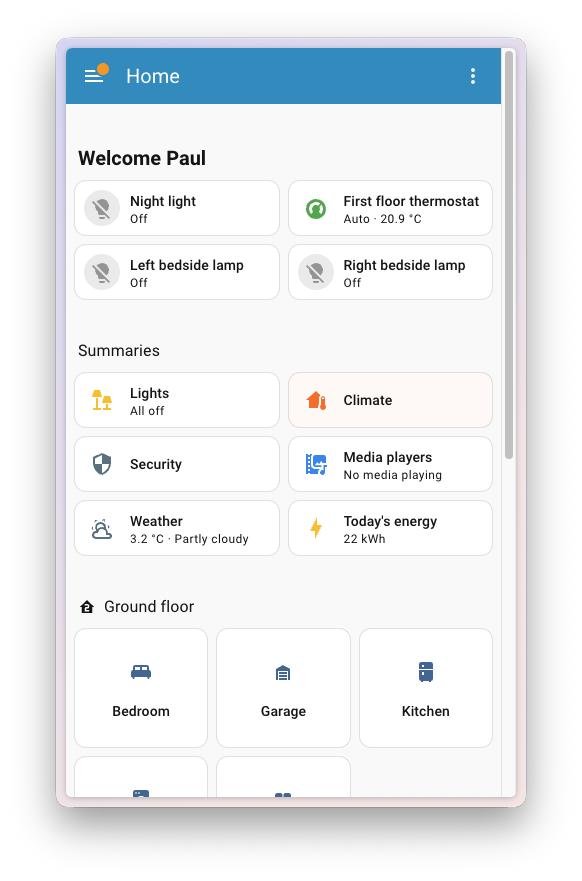
The desktop experience remains unchanged, with summaries displayed in the sidebar under the For you heading.
New devices page
Ever wondered where your devices went after you removed them from an area? A new Devices page now appears on the Home dashboard, showing all devices that aren’t currently assigned to a specific area. This makes it easy to find and control those “orphaned” devices without hunting through the settings.
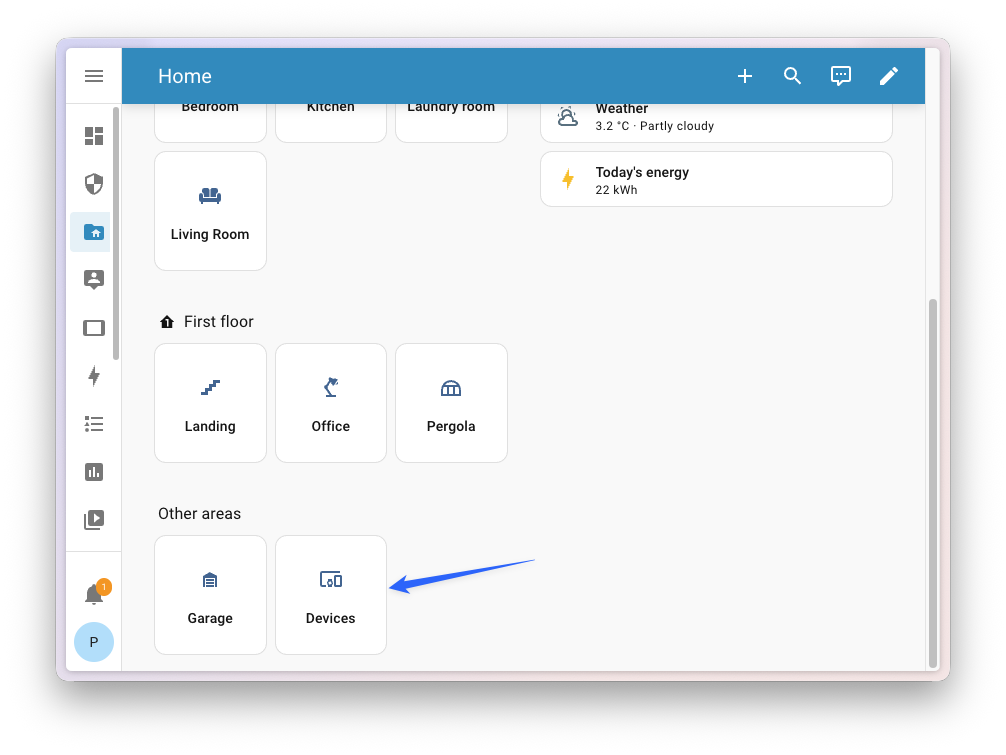 The new Devices page shows devices not assigned to any area.
Purpose-specific triggers and conditions progress
In the previous release, we introduced purpose-specific triggers and conditions. Instead of thinking in technical state changes, you can now simply pick things like “When a light turns on” or “If the climate is heating” when building your automations.
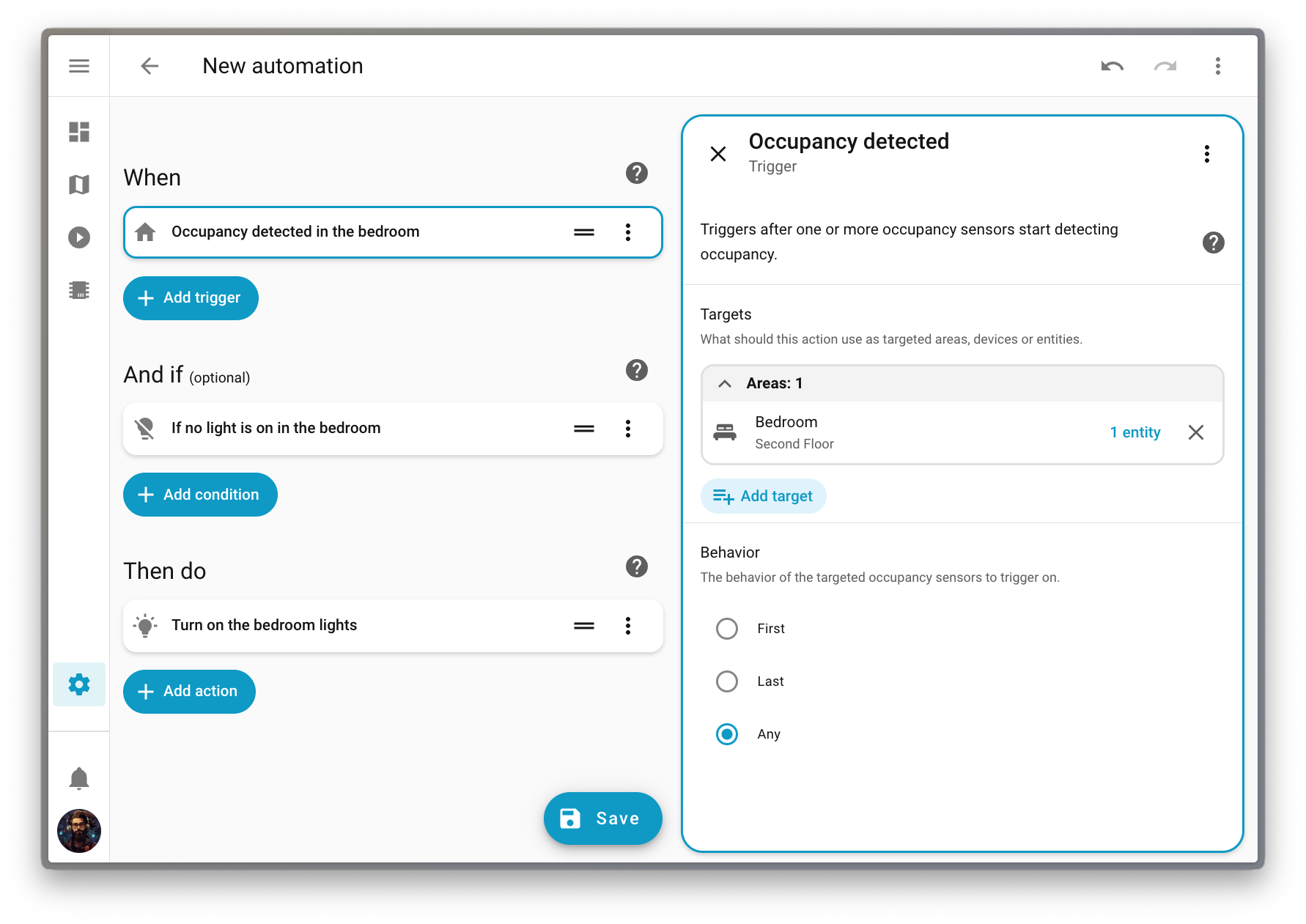
This feature is still being refined in Home Assistant Labs, but this release adds a lot more trigger types, making this new approach even more useful. Here is an overview of all the new triggers added in this release:
- Button triggers fire when a button entity has been pressed.
- Climate triggers now cover all common scenarios. You can trigger on HVAC mode changes, target temperature changes, or when the target temperature crosses a threshold. There are also triggers for current temperature and humidity changes, and even target humidity changes.
- Device tracker triggers let you automate based on when a device entered or left home, with support for the first device arriving, last device leaving, or any change. Don’t worry, person-specific triggers are coming soon, the device tracker ones were simply available sooner.
- Humidifier triggers will fire when a humidifier turns on or off, starts humidifying, or starts drying. You can also trigger on humidity changes or when humidity crosses a threshold.
- Light triggers let you automate based on brightness changes or when brightness crosses a specific threshold.
- Lock triggers can now fire when a lock is locked, unlocked, opened, or jammed.
- Scene triggers fire when a scene is activated.
- Siren triggers fire when sirens are turned on or off.
- Update trigger fires when an update becomes available.
As the new purpose-specific triggers and conditions all support targeting something bigger than a simple entity (an area, a floor, or even a label), we also redesigned how the target gets displayed on the automation flow.
The goal of this change is to allow you to quickly glance at your automation, and understand its purpose.
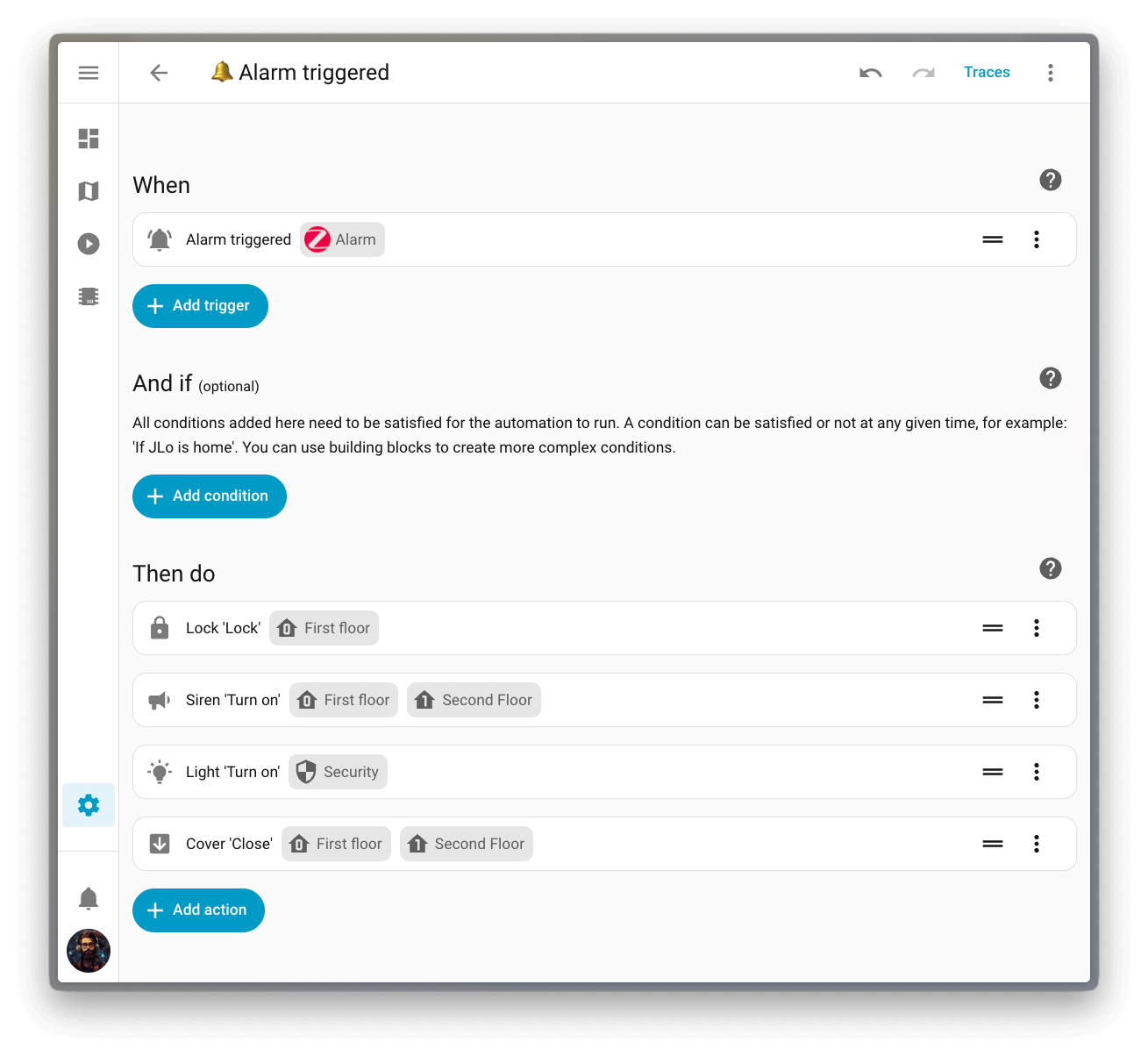
Head over to Settings > System > Labs to enable purpose-specific triggers and conditions and give them a try!
Easier navigation to protocol dashboards
For an organization that loves the open standards that seamlessly connect our devices, we sure didn’t promote them enough! Most people didn’t even know that Home Assistant has dedicated dashboards for protocols like Zigbee, Z-Wave, and more.
This release reorganizes the Settings page to give these open protocols a more prominent spot. The protocols section now appears right after the core settings, making it much easier to find all the different ways you’re connecting your devices and quickly access some very useful protocol-specific configurations.
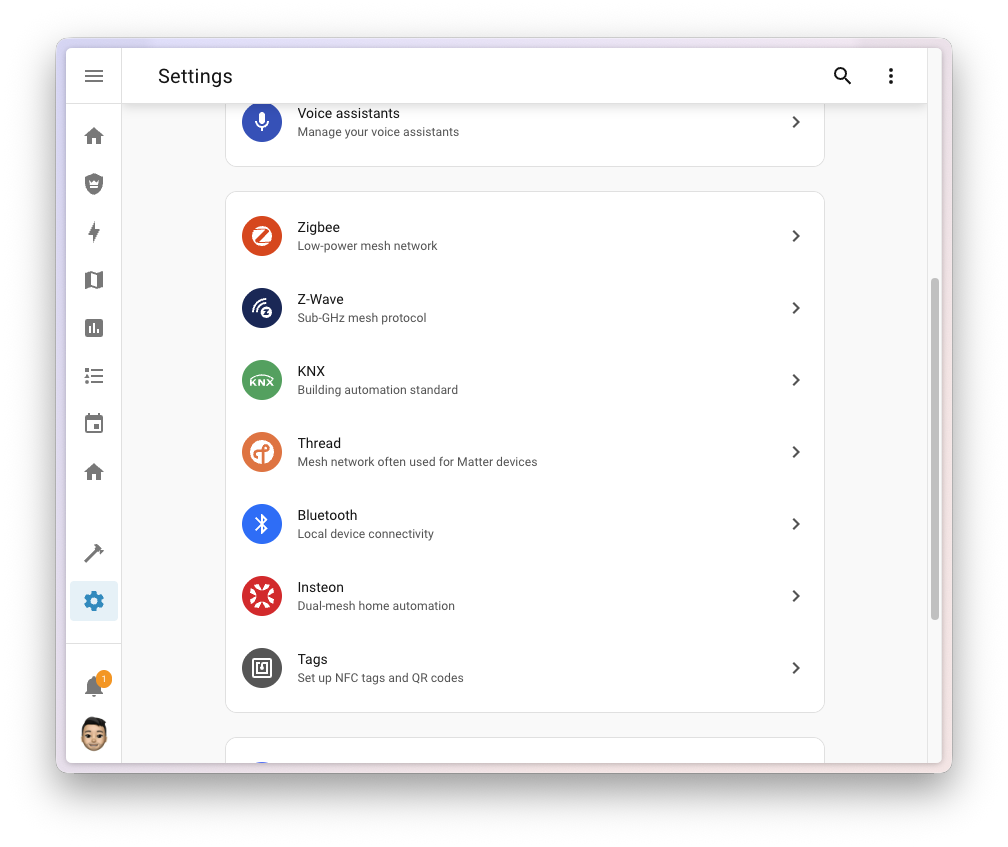
The menu items only appear when you have the corresponding integration set up, so you’ll only see what’s relevant to your setup.
Integrations
Thanks to our community for keeping pace with the new integrationsIntegrations connect and integrate Home Assistant with your devices, services, and more. [Learn more] and improvements to existing ones! You’re all awesome 🥰
New integrations
We welcome the following new integrations in this release:
-
AirPatrol, added by @antondalgren
Control your air conditioning units through AirPatrol Wi-Fi devices directly from Home Assistant. -
eGauge, added by @neggert
Integrate eGauge energy monitors for residential and commercial applications, commonly used with solar energy installations. -
Fluss+, added by @Marcello17
Connect your Fluss+ Button to Home Assistant for quick and easy control of your smart home. -
Fish Audio, added by @noambav
Use Fish Audio’s text-to-speech service to generate natural-sounding speech in Home Assistant. -
Fressnapf Tracker, added by @eifinger
Track the location of your pets and monitor their activity using Fressnapf GPS Trackers. -
HomeLink, added by @ryanjones-gentex
Integrate your HomeLink devices to trigger smart home routines from the comfort of your vehicle. -
Watts Vision +, added by @theobld-ww
Control your Watts Vision + smart heating system, allowing remote control of individual home heating zones. -
WebRTC, added by @balloob
An internal integration providing WebRTC functionality for camera streaming in Home Assistant.
This release also has new virtual integrations. Virtual integrations are stubs that are handled by other (existing) integrations to help with findability. These ones are new:
Noteworthy improvements to existing integrations
It is not just new integrationsIntegrations connect and integrate Home Assistant with your devices, services, and more. [Learn more] that have been added; existing ones are also being constantly improved. Here are some of the noteworthy changes to existing integrations:
- The Matter integration gained three new diagnostic binary sensors for thermostat remote sensing status from @lboue
, helping you keep an eye on your climate system. -
@joostlek
added lots of new sensors to the SmartThings integration, including air quality sensors for PM1, PM2.5, and PM10, hood filter usage tracking, fridge temperature sensors for One Door refrigerators, and fan speed control for range hoods. -
Roborock owners with Q7 devices can now integrate them thanks to @Lash-L
, who added basic read-only support with sensors for battery, status, and cleaning data. -
@mib1185
improved the FRITZ!SmartHome integration by adding switch entities that let you enable or disable FRITZ! Smart Home routines (triggers) directly from Home Assistant. - The Ping integration now tracks packet loss, thanks to @mib1185
. The new sensor shows packet loss as a percentage and is disabled by default. -
@Shulyaka
added support for GPT-5.2 and GPT-5.2-pro models to the OpenAI integration, including a new “xhigh” reasoning effort level. - The HomeWizard integration gained two new battery charge modes from @DCSBL
: zero charge only and zero discharge only, giving you more control over your energy storage. -
@Abestanis
expanded the KNX UI configuration to support time, date, and datetime entities, while @farmio added sensor, scene, text, and fan entities, making it easier than ever to set up your KNX installation. - The Squeezebox integration now offers alarm monitoring, thanks to @wollew
: you get binary sensors to track if an alarm is upcoming, active, or snoozed, plus a timestamp sensor showing when the next alarm is scheduled. -
@andrew-codechimp
added support for new meal plan types in Mealie 3.7, including dessert, drink, and snack plans, giving you more flexibility in your meal planning. - The Hikvision integration gained NVR support from @ptarjan
, including extended event detection and automatic discovery of video channels. -
@FredericMa
added a set_timeaction to the Risco integration, allowing you to sync your local alarm panel’s clock and fix those pesky clock drift issues. - The Nederlandse Spoorwegen integration got a major overhaul from @heindrichpaul
, splitting the monolithic sensor into over 15 individual sensors, one for each train route, making it much easier to track specific journeys. -
@zweckj
added a beautiful entity picture of your coffee machine to the La Marzocco integration’s main switch entity. - The Actron Air integration gained a new switch platform from @kclif9
, exposing Away Mode, Continuous Fan, Quiet Mode, and Turbo Mode controls. -
@Djelibeybi
gave the Pooldose integration a massive upgrade: you now get water meter sensors for monitoring levels, number entities for configuring dosing targets, and select entities for controlling your pool’s operating mode. - The AirPatrol integration now lets you monitor temperature and humidity, thanks to new sensor entities added by @antondalgren
. -
@mettolen
added sensor and number platforms to the Airobot integration, letting you monitor air quality data and control hysteresis band settings.
A huge thank you to all the contributors who improved these integrations, and to everyone else who contributed improvements that aren’t listed here. Your work makes Home Assistant better for everyone! ❤️
Integration quality scale achievements
One thing we are incredibly proud of in Home Assistant is our integration quality scale. This scale helps us and our contributors to ensure integrations are of high quality, maintainable, and provide the best possible user experience.
This release, we celebrate several integrationsIntegrations connect and integrate Home Assistant with your devices, services, and more. [Learn more] that have improved their quality scale:
-
2 integrations reached platinum 🏆
-
KNX, thanks to @farmio
-
UniFi Protect, thanks to @RaHehl
-
KNX, thanks to @farmio
-
4 integrations reached silver 🥈
-
Autarco, thanks to @klaasnicolaas
-
SFR Box, thanks to @epenet
-
Squeezebox, thanks to @peteS-UK
, @pssc and @rajlaud -
Watergate, thanks to @adam-the-hero
-
Autarco, thanks to @klaasnicolaas
-
2 integrations reached bronze 🥉
-
Growatt Server, thanks to @johanzander
-
TP-Link Omada, thanks to @MarkGodwin
-
Growatt Server, thanks to @johanzander
This is a huge achievement for these integrations and their maintainers. The effort and dedication required to reach these quality levels is significant, as it involves extensive testing, documentation, error handling, and often complete rewrites of parts of the integration.
A big thank you to all the contributors involved! 👏
Now available to set up from the UI
While most integrationsIntegrations connect and integrate Home Assistant with your devices, services, and more. [Learn more] can be set up directly from the Home Assistant user interface, some were only available using YAML configuration. We keep moving more integrations to the UI, making them more accessible for everyone to set up and use.
The following integrations are now available via the Home Assistant UI:
-
Hikvision, done by @ptarjan
-
VIVOTEK, done by @HarlemSquirrel
Other noteworthy changes
There are many more improvements in this release; here are some of the other noteworthy changes:
- If you monitor your home’s oil tank or other slow flow rates, you might appreciate the new gallons per day unit of volume flow rate added by @StaleLoafOfBread
. This unit is particularly useful for tracking daily consumption rates of heating oil or similar resources. - Got a Matter speaker? @lboue
added volume control support to the Matter integration, exposing a volume slider entity for Matter speakers using the LevelControl cluster. - The statistics graph card now includes a link to the history panel in its header, just like the history graph card already had. Selecting the link takes you directly to the history with the same entities and time range pre-selected, thanks to @joepio
. - When using the state badge element in your picture elements card, you can now set a custom
nameoption, giving you more flexibility in your dashboard designs, thanks to @ildar170975. - In 2025.11 we improved the logging efficiency by disabling the duplicated log file. This release adds a new configuration option to re-enable it if needed. If you are using the official Terminal & SSH add-on, make sure it is updated to 9.22.0 or higher to be able to use that option. The Advanced SSH & Web Terminal add-on has not been updated yet, but will be soon.
- For integration developers: @bramkragten
added a new choose selector, allowing users to select between different input types in the UI. You’ll start seeing this pop up in various places where flexible input is needed.
Energy dashboard date picker
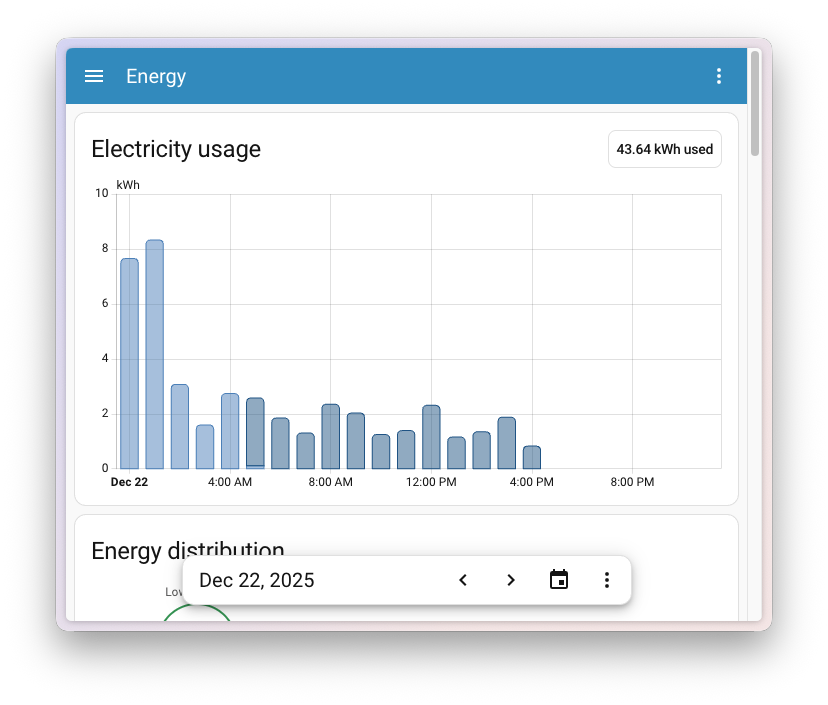
In the previous release, the Energy dashboard received a big update with real-time power monitoring and downstream water tracking. However, some of you noticed that navigating between periods required scrolling back up, making it harder to compare data while looking at graphs further down the page.
This release fixes that! The date picker is now sticky at the bottom of the screen, so you can easily switch between days, weeks, or months without losing sight of the graph you’re viewing. This also makes it much easier to access on mobile devices.
ESPHome action responses
ESPHome 2025.12
Previously, when calling an action on an ESPHome device, communication was one-way: you could send a command, but the device couldn’t send structured data back. Now, your ESPHome devices can return JSON data in response to actions, unlocking new possibilities like querying device configuration, reading sensor values on demand, or retrieving diagnostic information.
This is particularly useful for actions that answer questions rather than perform tasks. For example, you could create an action that returns your device’s current Wi-Fi signal strength, firmware version, or any custom sensor readings, all as structured data you can use in your automations.
To get started, check out the ESPHome documentation on action responses
Patch releases
We will also release patch releases for Home Assistant 2026.1 in January. These patch releases only contain bug fixes. Our goal is to release a patch release once a week, aiming for Friday.
2026.1.1 - January 12
- Fix Hikvision NVR binary sensors not being detected (@ptarjan
- #160254 ) - Bump eheimdigital to 1.5.0 (@autinerd
- #160312 ) - Bump ZHA to 0.0.84 (@TheJulianJES
- #160440 ) - Bump pyOverkiz to 1.19.4 (@iMicknl
- #160457 ) - Fix JSON serialization of time objects in anthropic tool results (@dcermak
- #160459 ) - Add asyncio-level timeout to Backblaze B2 uploads (@ElCruncharino
- #160468 ) - Fix Requirement parsing in RequirementsManager (@epenet
- #160485 ) - Add Nettleie optimization option (@osohotwateriot
- #160494 ) - Bump python-otbr-api to 2.7.1 (@emontnemery
- #160496 ) - fix rain sensor for some rare velux windows (@wollew
- #160504 ) - Fix trigger selectors (@bramkragten
- #160519 ) - Bump Intergas Incomfort-client to v0.6.11 (@jbouwh
- #160520 ) - Revert “Update voluptuous and voluptuous-openapi” (@synesthesiam
- #160530 ) - Bump serialx to v0.6.2 (@puddly
- #160545 ) - Catch any migration failures in Teslemetry (@Bre77
- #160549 ) - Fix AttributeError for missing/incomplete health data in Tractive (@bieniu
- #160553 ) - Bump pysilero-vad to 3.1.0 (@synesthesiam
- #160554 ) - Fix for older Fritzbox models which do not support smarthome triggers (@mib1185
- #160555 ) - Bump google-air-quality-api to 2.1.2 (@Thomas55555
- #160561 ) - Fix Climate signal in Teslemetry (@Bre77
- #160571 ) - Bump pysma to 1.1.0 (@kellerza
- #160583 ) - Bump opower to 0.16.1 (@tronikos
- #160588 ) - Fix config flow bug in Tesla Fleet (@Bre77
- #160591 ) - Add missing segment speed icons for WLED (@Tommatheussen
- #160597 ) - Better handling of ratelimiting from Tibber (@Danielhiversen
- #160599 ) - Change device class to energy_storage for some enphase_envoy battery entities (@catsmanac
- #160603 ) - Fix Z-Wave creating notification binary sensor for idle state (@MartinHjelmare
- #160604 ) - Bump pynintendoparental to 2.3.2 (@pantherale0
- #160626 ) - Update frontend to 20260107.1 (@bramkragten
- #160644 ) - Bump pyhik to 0.4.0 (@ptarjan
- #160654 ) - Bump greeclimate to 2.1.1 (@cmroche
- #160683 ) - Bump pysilero-vad to 3.2.0 (@synesthesiam
- #160691 ) - Revert bthome-ble back to 3.16.0 to fix missing data (@Ernst79
- #160694 ) - Fix missing key for brew by weight in lamarzocco (@zweckj
- #160722 ) - Bump pytado 0.18.16 (@erwindouna
- #160724 ) - Bump python-homewizard-energy to 10.0.1 (@DCSBL
- #160736 ) - Fix fitbit icon (@joostlek
- #160750 )
2026.1.2 - January 16
- Fix Airzone Q-Adapt select entities (@Noltari
- #160695 ) - Revert back to microVAD (@synesthesiam
- #160821 ) - Bump opower to 0.16.2 (@tronikos
- #160822 ) - accept leading zeros in sms_code for fressnapf_tracker (@eifinger
- #160834 ) - Add support for packaging version >= 26 on the version bump script (@edenhaus
- #160858 ) - Update PyNaCl to 1.6.2 (@cdce8p
- #160909 ) - Bump pyenphase from 2.4.2 to 2.4.3 (@catsmanac
- #160912 ) - Decrease Essent update interval to 1 hour (@jaapp
- #160959 ) - Bump opower to 0.16.3 (@tronikos
- #160961 ) - Bump PySrDaliGateway from 0.18.0 to 0.19.3 (@niracler
- #160972 ) - Add descriptions to openai_conversation (@zweckj
- #160979 ) - Clean up unnecessary Z-Wave “device config changed” repairs (@AlCalzone
- #161000 ) - Update knx-frontend to 2026.1.15.112308 (@farmio
- #161004 ) - Require admin for blueprint ws commands (@edenhaus
- #161008 ) - Bump aiomealie to 1.2.0 (@andrew-codechimp
- #161058 ) - Update frontend to 20260107.2 (@bramkragten
- #161061 ) - Update aioairzone to v1.0.5 (@Noltari
- #160688 )
2026.1.3 - January 23
- Bump uiprotect to 8.1.1 (@RaHehl
- #160816 ) - Update list of supported locations for London Air (@allanlewis
- #160884 ) - Bump onedrive-personal-sdk to 0.1.0 (@zweckj
- #160976 ) - Adjust battery voltage sensor display precision for Matter devices (@lboue
- #161088 ) - Fix color temperature attributes in wiz (@arturpragacz
- #161125 ) - Bump xiaomi-ble to 1.4.3 (@terop
- #161132 ) - Bump opower to 0.16.4 (@tronikos
- #161153 ) - Fix detection of multiple smart object types in single event (@RaHehl
- #161189 ) - Fix icons for ‘moving’ state (@stickpin
- #161194 ) - Bump onedrive-personal-sdk to 0.1.1 (@zweckj
- #161337 ) - Bump uiprotect to 10.0.0 (@RaHehl
- #161350 ) - Migrate config entries to string unique id (@edenhaus
- #161370 ) - Bump uiprotect to 10.0.1 (@RaHehl
- #161397 ) - Bump Insteon panel to 0.6.1 (@teharris1
- #161411 ) - Bump music-assistant-client to 1.3.3 (@arturpragacz
- #161438 ) - Revert deprecation of
server_hostfor container installations (@emontnemery- #161443 ) - Bump opower to 0.16.5 (@tronikos
- #161450 )
Need help? Join the community
Home Assistant has a great community of users who are all more than willing to help each other out. So, join us!
Our very active Discord chat server is an excellent place to be, and don’t forget to join our amazing forums.
Found a bug or issue? Please report it in our issue tracker
Are you more into email? Sign up for the Open Home Foundation Newsletter to get the latest news about features, things happening in our community, and other projects that support the Open Home straight into your inbox.
Backward-incompatible changes
We do our best to avoid making changes to existing functionality that might unexpectedly impact your Home Assistant installation. Unfortunately, sometimes it is inevitable.
We always make sure to document these changes to make the transition as easy as possible for you. This release has the following backward-incompatible changes:
Coolmaster
The climate entities provided by the Coolmaster integration now use medium for the medium fan mode; before this change, it was med. If your automations are using med when setting or querying the fan speed, you’ll have to change it to medium.
Tailscale
The “Supports hairpinning” binary sensor has been removed from the Tailscale integration. According to the official Tailscale API documentation, this information is no longer tracked and will always return null.
UniFi Protect
Select entity state values have been changed from their original mixed-case format to snake_case format with proper translations. This improves consistency and enables proper localization support.
Affected select entities include: chime type, recording mode, infrared mode, status light mode, HDR mode, doorbell text, LCD message, and others.
Example changes:
- Chime type:
Mechanical→mechanical,Digital→digital - Recording mode:
Always→always,Detections→detections,Never→never - Infrared mode:
Auto→auto,On→on,AutoNoLEDsOn→auto_no_leds_on - Status light mode:
On→on,Off→off,OnWhenDark→on_when_dark - HDR mode:
Auto→auto,On→on,Off→off
If you have automations, scripts, or templates that check or set the state of UniFi Protect select entities, you need to update them to use the new snake_case values. The UI will continue to display properly translated, human-readable text.
(@RaHehl
Telegram bot
Allowing extra/unused parameters has been removed from the action for Telegram bot. Only users who have used undefined parameters for Telegram bot actions are affected. If you are affected, remove such parameters from your automations and scripts. Supported parameters can be found in the Telegram bot notification actions documentation.
(@hanwg
VeSync
The advancedSleep fan mode has been changed to advanced_sleep. If you have automations or scripts using this fan mode, please update them accordingly.
(@cdnninja
If you are a custom integration developer and want to learn about changes and new features available for your integration, be sure to follow our developer blog.
All changes
Of course, there is a lot more in this release. You can find a list of all changes made here: Full changelog for Home Assistant Core 2026.1.