2026.3: A clean sweep
 Franck Nijhof
Home Assistant 2026.3! 🎉
After last month’s massive release, this one is a nice and relaxed one. We took a step back from the big headline features and fully focused on something equally important: getting the amazing contributions from our community reviewed, polished, and merged. 💚
And did our community deliver! This release is packed with tons of new integrationsIntegrations connect and integrate Home Assistant with your devices, services, and more. [Learn more], lots of noteworthy improvements to the ones you already use, boatloads of bug fixes, and a really nice list of integrations that climbed up the integration quality scale. 📈
It’s releases like these that really show the strength of our open-source community. Every single contribution matters, and this month that shows more than ever. Thank you all! 🙏
My personal favorite this month? The automation editor change: Continue on error has finally landed in the UI. I actually wrote this feature years ago, but it was only available through YAML. Seeing it now land in the visual editor (making it accessible to everyone) is just awesome. It’s one of those small things that make a big difference in everyday use. 🤩
Oh, and before I forget: have you seen our brand new merch store? The Open Home Foundation store is live! I have to be honest: the quality is really great. The hoodie is so darn comfy it’s ridiculous. I’ve been wearing mine non-stop. Go check it out! 🏃
Also, mark your calendars: State of the Open Home 2026 is happening on April 8 in Utrecht, the Netherlands! Join us live in the audience for a celebration of everything we’ve built together, a look at what’s ahead, and your chance to help shape the future of the Open Home. Tickets are limited, so grab yours while you can! 🎟️
Enjoy the release!
../Frenck
- Send your vacuum to clean specific areas
- Energy dashboard improvements
- Continue on error in the automation editor
- Wake word detection on your Android phone (experimental)
- Integrations
- Other noteworthy changes
- Patch releases
- Need help? Join the community
- Backward-incompatible changes
- All changes
A huge thank you to all the contributors who made this release possible! And a special shout-out to @TimoPtr, @arturpragacz, and @MindFreeze who helped write the release notes this release. Also, @CoMPaTech, @balloob, @OnFreund, and @silamon for putting effort into tweaking its contents. Thanks to them, these release notes are in great shape. ❤️
Send your vacuum to clean specific areas
Got a robot vacuum? You can now tell it exactly which areas to clean! This release introduces the clean area action, which lets you send your vacuum to clean one or more specific areas on demand, right from Home Assistant. In this release, it’s supported by Matter, Ecovacs, and Roborock.
The best part? The action uses your existing Home Assistant areas, not some obscure vendor-specific identifiers. You simply map the segments your vacuum knows about to the areas you’ve already set up in Home Assistant, and that’s all there is to it.
Getting started
When your vacuum supports area cleaning, you can set up the mapping through the vacuum’s entity settings. Open the vacuum entity, select the
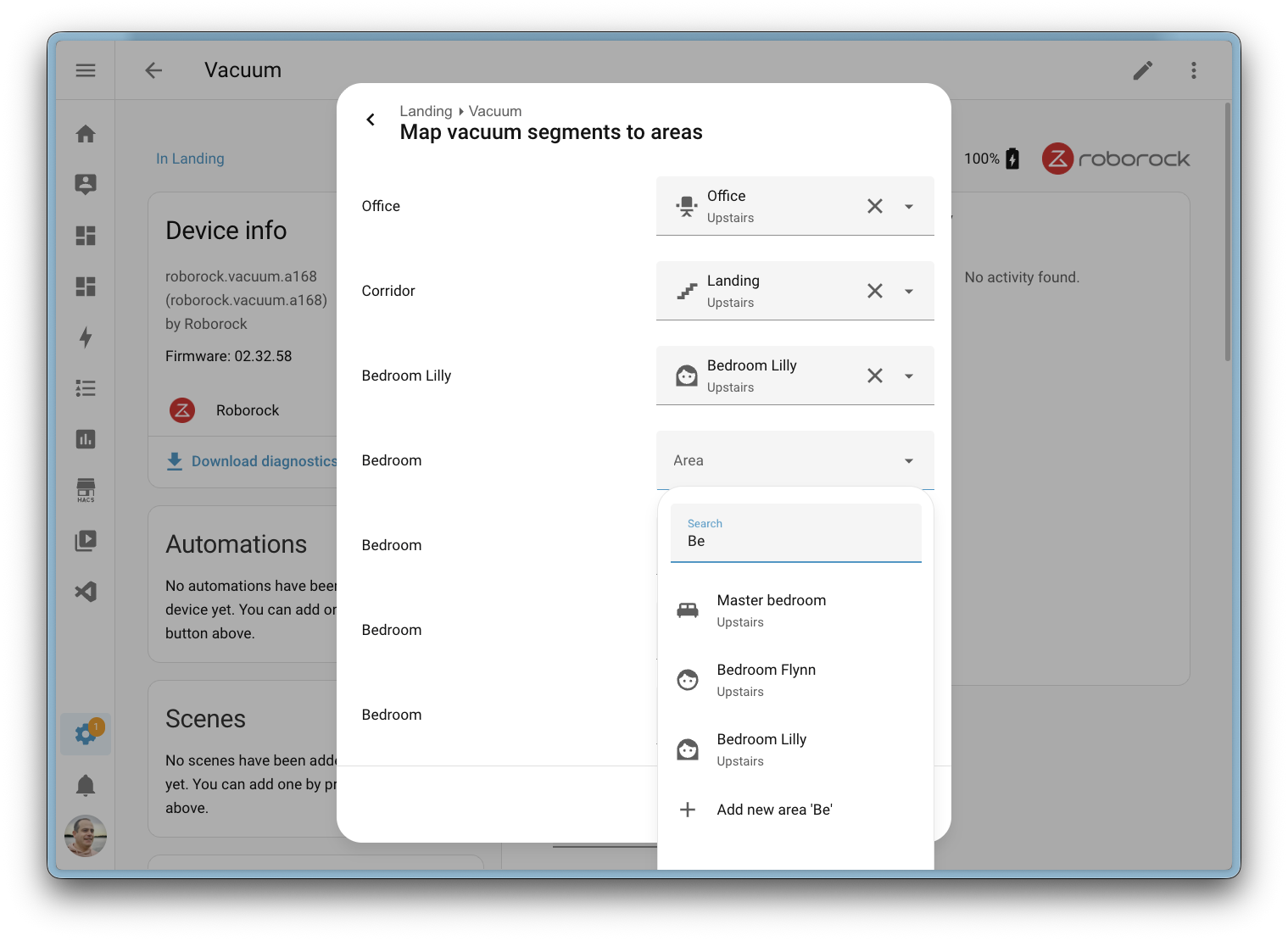
If your vacuum’s internal segment layout ever changes (for example, after remapping in the manufacturer’s app or the vacuum rediscovering its environment), Home Assistant will notice. A repair issue will alert you that the segments have changed, so you can update your mapping and make sure everything stays in sync.
Paving the way for voice
Because the mapping uses native Home Assistant areas, this feature lays the groundwork for future voice assistant support. Imagine simply saying “clean the kitchen” and having your vacuum head to the right area. That’s not available just yet, but the foundation is now in place to make it happen.
Energy dashboard improvements
The Energy dashboard received a nice batch of improvements this release.
The Now view gained badges that show real-time power consumption, gas flow rate, and water flow rate at a glance. Water also gets its own Sankey chart in the Now view, giving you a visual breakdown of water usage across your home, just like the existing power Sankey chart.

To reduce ambiguity, the second tab on the Energy dashboard has been renamed from Energy to Electricity, since the dashboard covers electricity, gas, and water. On the configuration side, the energy settings page is now split into three tabs: Electricity, Gas, and Water, making it easier to find and manage your energy sources.
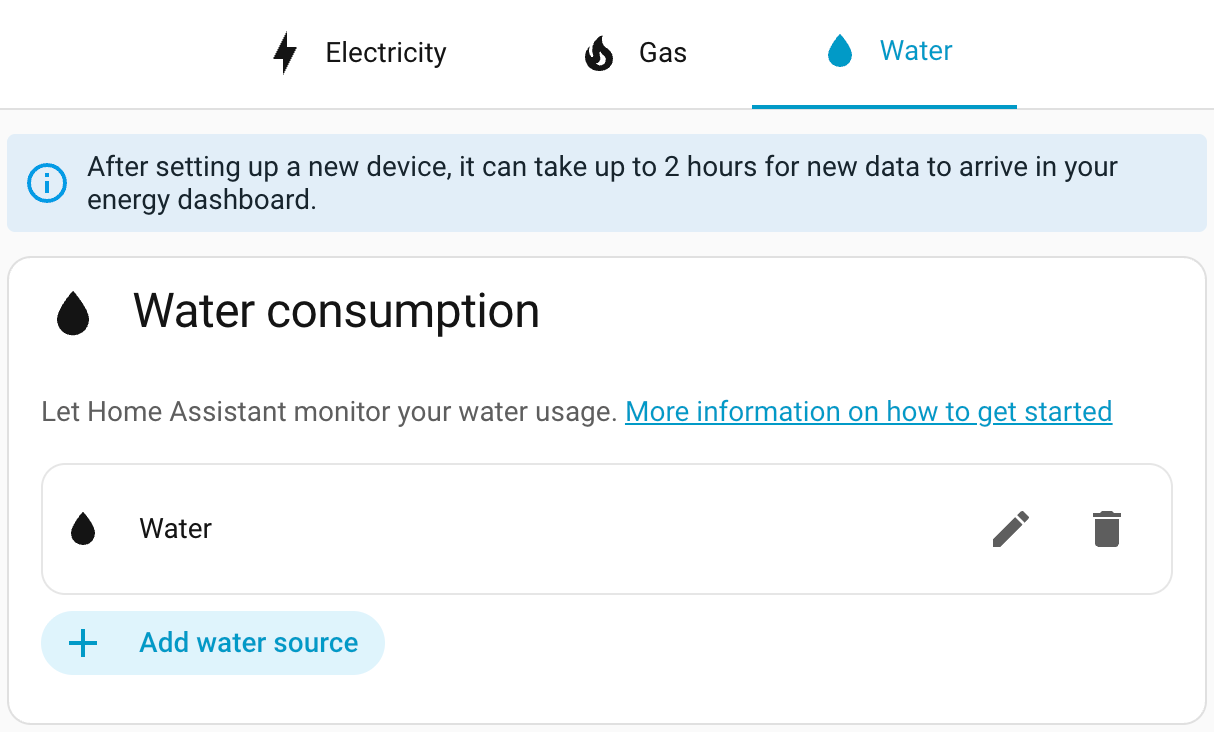
Finally, energy bar chart tooltips now include the day of the week, helping you quickly spot usage patterns.
Thanks, @MindFreeze, @NoRi2909, and @gpoitch! 🎉
Continue on error in the automation editor
The automation editor now has a Continue on error option for actions, directly accessible from the visual editor. Previously, this setting was only available through YAML.
You can find it in the three-dots
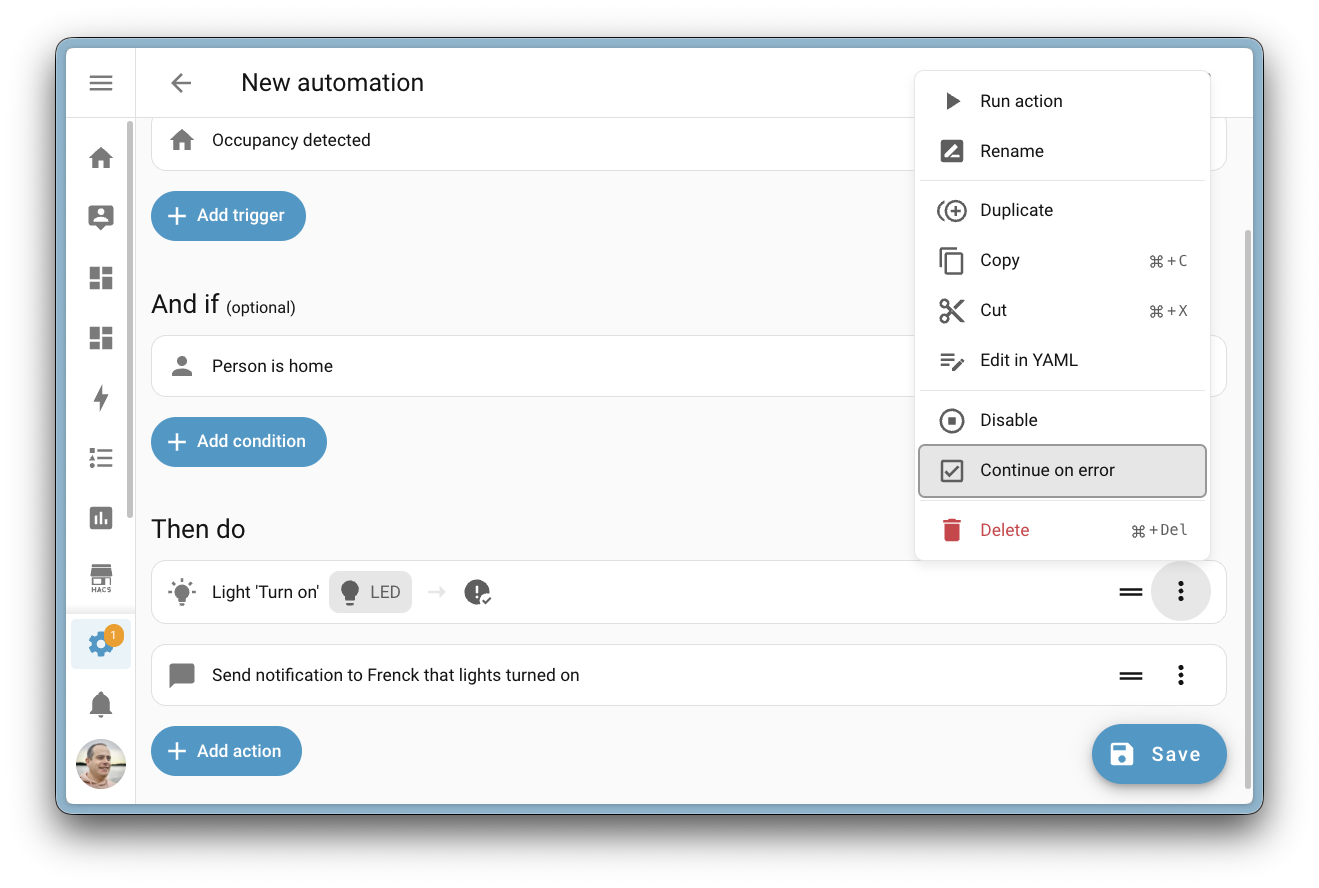
This is especially handy for automations where a single failing action shouldn’t stop the rest from running. For example, if one of several notification actions fails, the remaining ones will still be sent.
Thanks, @wendevlin! 🎉
Wake word detection on your Android phone (experimental)
Your phone just became a voice satellite! The Home Assistant Companion app for Android now supports on-device wake word detection, allowing you to open Assist from anywhere; even when your phone is locked.
Inspired from the great work from @brownard in Ava.
This feature uses microWakeWord, the same lightweight wake word engine that powers the Home Assistant Voice Preview Edition. All processing happens locally on your device, no audio is sent to the cloud, and no server-side processing is needed. Your voice stays on your phone.
You can choose between three wake words:
- Okay Nabu
- Hey Jarvis
- Hey Mycroft
To enable wake word detection, open your Android device’s Settings > Companion App > Assist for Android, and enable the Enable wake word detection toggle. Once enabled, simply say your chosen wake word and the Assist pipeline will open, ready to take your command.
Watch the video to see wake word detection in action on an Android device.
It already integrates with your voice equipment at home, and if another satellite is nearby, only the fastest one will respond. This also applies to multiple Android devices.
Battery usage
Because wake word detection requires continuous microphone access and CPU usage, this feature does have a noticeable impact on battery life. To help manage this, you can use automations to start and stop wake word detection based on your context, for example, only enabling it when you’re connected to your home Wi-Fi or within a specific zone. This way, you get hands-free voice control when it matters most, without draining your battery all day.
Battery usage could be drastically reduced if Google opened their API for hardware hotword detection. Unfortunately, this is hidden behind a system API that only phone manufacturers have access to. Maybe one day they will open it up to improve the experience.
Thanks, @TimoPtr! 🎉
Integrations
Thanks to our community for keeping pace with the new integrationsIntegrations connect and integrate Home Assistant with your devices, services, and more. [Learn more] and improvements to existing ones! You’re all awesome 🥰
New integrations
We welcome the following new integrations in this release:
-
Ghost, added by @JohnONolan
Monitor your Ghost publication metrics, including member counts, revenue, post statistics, and email newsletter performance, right from your Home Assistant dashboard. -
Hegel Amplifier, added by @boazca - launching at 🥈 silver quality
Control your Hegel Music Systems amplifiers locally over your network. Manage power, volume, input selection, and mute with real-time push updates for instant feedback. -
Homevolt, added by @Danielhiversen - launching at 🥈 silver quality
Read local data from your Homevolt battery over your network, no cloud required. Monitor power, energy, voltage, temperature, and battery status. -
Hypontech Cloud, added by @jcisio
Monitor your Hypontech solar inverter system through the Hypontech Cloud platform. Track power production, energy yields, and system status. -
IDrive e2, added by @patrickvorgers
Back up your Home Assistant to an IDrive e2 bucket. IDrive e2 offers affordable S3-compatible cloud storage with flexible access controls for keeping your backups safe. -
Indevolt, added by @Xirt
Communicate directly with your Indevolt energy storage devices over the local network. Monitor energy production, consumption, and battery status. -
IntelliClima, added by @dvdinth
Integrate your Fantini Cosmi Ecocomfort 2.0 ventilation devices. Control fan modes and speeds of your mechanical ventilation with heat recovery system. -
Liebherr, added by @mettolen - launching at 🥈 silver quality
Control and monitor your Liebherr SmartDevice refrigerators and freezers via the cloud. Monitor temperatures, adjust cooling settings, and automate food safety alerts. -
MTA New York City Transit, added by @OnFreund - launching at 🥈 silver quality
Get real-time arrival predictions for all NYC subway and bus lines using data from the Metropolitan Transportation Authority (MTA). -
MyNeomitis, added by @l-pr
Connect your Axenco MyNeomitis heating and energy management devices, such as electric radiators, towel rails, and underfloor heating, to Home Assistant. -
OneDrive for Business, added by @zweckj - launching at 🏆 platinum quality
Use OneDrive for Business as a backup location for your Home Assistant backups. Great for users with a Microsoft 365 business subscription. -
Powerfox Local, added by @klaasnicolaas - launching at 🏆 platinum quality
Gather data from your Powerfox Poweropti device directly over your local network, offering faster updates with no cloud dependency. -
Redgtech, added by @Jonhsady
Connect your Redgtech smart switches to Home Assistant. Control and monitor your cloud-connected switches and relays from this Brazilian smart home brand. -
System Nexa 2, added by @konsulten - launching at 🥈 silver quality
Integrate your System Nexa 2 smart home devices locally. Control lights, switches, and smart plugs with support for dimmers and outdoor plugs. -
Teltonika, added by @karlbeecken - launching at 🥈 silver quality
Monitor your Teltonika Networks routers running RutOS. Track cellular signal quality, modem temperature, and network connectivity. -
Trane Local, added by @bdraco
Locally control Trane and American Standard thermostats over your network using a direct mTLS connection. No cloud required. -
Zinvolt, added by @joostlek
Monitor your Zinvolt batteries in Home Assistant, including state of charge and other battery metrics.
This release also has new virtual integrations. Virtual integrations are stubs that are handled by other (existing) integrations to help with findability. These ones are new:
Noteworthy improvements to existing integrations
It is not just new integrationsIntegrations connect and integrate Home Assistant with your devices, services, and more. [Learn more] that have been added; existing ones are also being constantly improved. Here are some of the noteworthy changes to existing integrations:
- Matter now supports carbon monoxide alarm states and TVOC air quality level sensors. If you have Matter-certified CO sensors or air quality devices, they now show up in Home Assistant. Thanks, @Leo2442926161 and @lboue!
- HomeKit Controller now exposes water level sensors, so devices like the Smartmi Humidifier Rainforest will show their current water level in Home Assistant. Thanks, @romanlytvyn!
- Reolink cameras gained five new diagonal and continuous rotation PTZ buttons, plus the PTZ patrol switch now correctly reports its real-time status. Thanks, @starkillerOG!
- SmartThings now supports dual-cavity Samsung ovens, with separate entities for each chamber. It also gained switch and select controls for Samsung dishwasher washing options like sanitize, heated dry, and speed booster. Thanks, @mik-laj and @edu-tsen!
- Roborock now fully supports Zeo washing and drying machines with program selection, temperature control, drying modes, and detergent status sensors. Thanks, @yangqian!
-
OpenAI Conversation now supports the
gpt-image-1.5image generation model for AI Tasks, offering cheaper and faster image generation. Thanks, @Shulyaka! -
UniFi Protect cameras now have PTZ support with a
ptz_goto_presetaction for triggering presets and a PTZ patrol select entity with live state updates. Thanks, @RaHehl! - SwitchBot now lets you add passwords to Keypad Vision devices programmatically. It also gained a slow mode setting for curtain devices, which can reduce noise and improve reliability with heavier curtains. Thanks, @zerzhang and @ljmerza!
- Alexa Devices now supports Amazon Air Quality Monitor devices, exposing sensors for air quality index, VOC index, humidity, temperature, and particulate matter. Thanks, @jamesonuk!
- VeSync humidifiers now have a switch to enable or disable auto-drying mode for humidifier pads. Thanks, @cdnninja!
- SwitchBot Cloud now supports the SwitchBot AI Art Frame with battery level, next/previous picture buttons, and a display image entity showing the current picture. Thanks, @XiaoLing-git!
- KNX now allows configuring number entities and sending the current time directly from the UI. Additionally, expose gained a new periodic send option to periodically re-send entity states to the bus. Thanks, @farmio!
- MELCloud air-to-water devices now have additional sensors for RSSI signal strength, condensing temperature, fan frequency, and estimated energy produced. Thanks, @ffourcot!
-
Nanoleaf replaced its underlying library with
aionanoleaf2, fixing authorization errors that prevented newer Nanoleaf Essentials devices from connecting. Thanks, @loebi-ch! - Uptime Kuma monitors now have uptime ratio and average response time sensors for 1-day, 30-day, and 365-day periods. Thanks, @tr4nt0r!
-
Radarr gained two new actions:
radarr.get_moviesandradarr.get_queue, returning detailed information about movies in your library and the current download queue. Thanks, @Liquidmasl! - Renault vehicles now have buttons to remotely sound the horn or flash the lights. Thanks, @sebastiaanspeck!
- Proxmox VE gained a sensor platform with CPU usage, memory usage, disk usage, and status sensors for nodes, virtual machines, and containers. Thanks, @erwindouna!
-
Mealie now has a
get_shopping_list_itemsaction that returns structured shopping list data, useful for automations that need more detail than the to-do entity provides. Thanks, @andrew-codechimp! - Ambient Weather Station now exposes sensors for the AQIN indoor air quality monitor, including PM2.5, PM10, CO2, temperature, humidity, and AQI measurements. Thanks, @n-6!
- WeatherFlow Tempest stations now show battery level as a percentage for consistency with other integrations. Thanks, @pkolbus!
- SleepIQ now provides five new sleep health sensors per sleeper: sleep score, sleep duration, heart rate average, respiratory rate average, and heart rate variability. Thanks, @rhcp011235!
- Anthropic now supports the Claude Opus 4.6 model with adaptive thinking effort levels, and gained native structured outputs for more accurate tool calls on models 4.5 and newer. Thanks, @Shulyaka!
- Tessie received several enhancements: an energy remaining sensor for vehicles, battery health diagnostics, island and grid status sensors for energy sites, and full energy history support for the Home Assistant Energy Dashboard. Thanks, @jrhillery and @Bre77!
-
Portainer now supports Docker stack monitoring and control with status sensors, container counts, and start/stop switches. It also gained a
prune_imagesaction to clean up unused Docker images. Thanks, @erwindouna! - Nintendo Parental Controls now has a bedtime end time entity, complementing the existing bedtime start time for a complete bedtime schedule. Thanks, @pantherale0!
- LG Soundbar now supports play/pause media control, shows track title, artist, and album art, and reports playing/paused state. Thanks, @alexmerkel!
- Velux now supports on/off switches connected to the KLF 200 gateway. Thanks, @wollew!
- Switcher now supports Switcher heater devices for monitoring and control. Thanks, @YogevBokobza!
- Cambridge Audio devices now have a room correction switch for compatible models. Thanks, @noahhusby!
- Vera metered switches now expose power and energy sensors, bringing energy monitoring to your Vera devices. Thanks, @jronnols!
- Control4 thermostats now support fan mode control with Auto, Circulate, and On modes. Thanks, @davidrecordon!
- BSB-Lan now shows the current HVAC action (heating, cooling, idle) on the climate entity and gained a button to synchronize your heating system’s clock. Thanks, @liudger!
- JVC Projector gained a wide range of new sensors and controls: source, color depth, HDR status, picture mode, installation mode, light power, and switches for E-Shift and Low Latency Mode. Thanks, @SteveEasley!
- NRGkick EV chargers now have a switch to enable or pause car charging directly from Home Assistant. Thanks, @andijakl!
- Green Planet Energy now shows timestamp sensors for the highest and lowest energy price times of the day, helping you time your energy usage. Thanks, @petschni!
- Compit expanded significantly with new water heater, number, and binary sensor platforms for controlling hot water, adjusting temperature settings, and monitoring device states across their HVAC product range. Thanks, @Przemko92!
-
Saunum now has a
start_sessionaction, letting you start a sauna session with custom duration, target temperature, and fan duration in a single call. Thanks, @mettolen! - Watts Vision + now supports controlling smart switches alongside the existing thermostat support. Thanks, @theobld-ww!
- Sunricher DALI now tracks energy consumption for DALI light devices connected through a Sunricher gateway. Thanks, @niracler!
Integration quality scale achievements
One thing we are incredibly proud of in Home Assistant is our integration quality scale. This scale helps us and our contributors to ensure integrations are of high quality, maintainable, and provide the best possible user experience.
This release, we celebrate several integrationsIntegrations connect and integrate Home Assistant with your devices, services, and more. [Learn more] that have improved their quality scale:
-
9 integrations reached platinum 🏆
- GIOŚ, thanks to @mik-laj
- HDFury, thanks to @glenndehaan
- Immich, thanks to @mib1185
- Namecheap DynamicDNS, thanks to @tr4nt0r
- Portainer, thanks to @erwindouna
- Ubiquiti airOS, thanks to @CoMPaTech
- Watts Vision +, thanks to @theobld-ww
- WLED, thanks to @mik-laj
- Xbox, thanks to @tr4nt0r
-
1 integration reached gold 🥇
- UptimeRobot, thanks to @chemelli74
-
6 integrations reached silver 🥈
- BSB-Lan, thanks to @liudger
- devolo Home Control, thanks to @Shutgun
- Mastodon, thanks to @andrew-codechimp
- NRGkick, thanks to @andijakl
- Teslemetry, thanks to @Bre77
- Velux, thanks to @wollew
-
7 integrations reached bronze 🥉
- Aladdin Connect, thanks to @JamieMagee
- Anthropic, thanks to @Shulyaka
- OpenAI, thanks to @zweckj
- OpenEVSE, thanks to @c00w
- Prana, thanks to @prana-dev-official
- Splunk, thanks to @Bre77
- VeSync, thanks to @cdnninja
This is a huge achievement for these integrations and their maintainers. The effort and dedication required to reach these quality levels is significant, as it involves extensive testing, documentation, error handling, and often complete rewrites of parts of the integration.
A big thank you to all the contributors involved! 👏
Now available to set up from the UI
While most integrationsIntegrations connect and integrate Home Assistant with your devices, services, and more. [Learn more] can be set up directly from the Home Assistant user interface, some were only available using YAML configuration. We keep moving more integrations to the UI, making them more accessible for everyone to set up and use.
The following integrations are now available via the Home Assistant UI:
- InfluxDB, done by @RobBie1221
- Ness Alarm, done by @Poshy163
- Splunk, done by @Bre77
Other noteworthy changes
There are many more improvements in this release; here are some of the other noteworthy changes:
- The settings pages for Matter, Z-Wave, Zigbee, and Bluetooth have been reorganized for better clarity and discoverability. Thanks, @matthiasdebaat!
- You can now ask your Assist to remove items from a to-do list! The new remove item intent complements the existing complete item intent, so managing your lists by voice just got even easier. Thanks, @mistic100!
- The statistics graph card editor now offers “Year” as a selectable period, making it easy to view annual trends right from the UI. Thanks, @karwosts!
- The Security dashboard now also shows window-type covers (automated windows), so they appear alongside your other window and door sensors. Thanks, @jhenkens!
- The sections view now supports footer cards, giving you a sticky card at the bottom of the viewport, similar to the existing view header. Thanks, @MindFreeze!
Running on Python 3.14 🚀
This release ships running on Python 3.14! In case you are wondering what that means: Python is the programming language Home Assistant is built with.
So, why does it matter to you? Python 3.14 brings performance improvements to the foundation that Home Assistant is built on. The new version includes a faster interpreter, improved startup times, and better memory usage, all of which contribute to a snappier Home Assistant experience. 🚀
Don’t worry! We handle the upgrade to Python 3.14 automatically for you on all officially supported installation methods. Just upgrade Home Assistant as you normally would, and you are good to go! 😎
Patch releases
We will also release patch releases for Home Assistant 2026.3 in March. These patch releases only contain bug fixes. Our goal is to release a patch release once a week, aiming for Friday.
2026.3.1 - March 6
- Fix Rain Bird controllers updated by Rain Bird 2.x (@rblakemesser - #163915)
- Bump spotifyaio to 2.0.2 (@joostlek - #164114)
- Hunter Douglas Powerview: Fix missing class in hierarchy. (@gwww - #164264)
- Ensure Snapcast client has a valid current group before accessing group attributes. (@mill1000 - #164683)
- Fix button entity creation for devices with more than two radios (@tl-sl - #164699)
- Fix IntesisHome outdoor_temp not reported when value is 0.0 (@antonio-mello-ai - #164703)
- Update keyboard_remote dependencies (@lanrat - #164755)
- more programs for Miele steam ovens (@sean797 - #164768)
- Enforce SSRF redirect protection only for connector allowed_protocol_schema_set (@RaHehl - #164769)
- Remove caio from licenses exception list (@epenet - #164806)
- Add device class to active_liter_lpm sensor (@glenndehaan - #164809)
- Update ness_alarm scan interval to 5 secs (@Poshy163 - #164835)
- Fix Ghost config flow using wrong field name for site UUID (@JohnONolan - #164836)
- Fix KNX sensor default attributes for energy and volume DPTs (@farmio - #164838)
- Fix volvo test RuntimeWarning (@cdce8p - #164845)
- Fix ‘this’ variable in template options flow (@Petro31 - #164866)
- Bump onedrive-personal-sdk to 0.1.5 (@zweckj - #164880)
- Pass in Base Url during Roborock reauth (@Lash-L - #164903)
- Bump aiovodafone to 3.1.3 (@chemelli74 - #164955)
- Fix energy unit in Homevolt (@Danielhiversen - #164959)
- Bump python-bsblan to 5.1.1 (@liudger - #164591)
- Bump python-bsblan to 5.1.2 (@liudger - #164963)
- Change setpoint step size in IronOS integration (@tr4nt0r - #164979)
- Bump aioswitcher to 6.1.1 (@thecode - #164981)
- Bump teltasync to 0.2.0 (@karlbeecken - #164995)
2026.3.2 - March 16
- Fix wifi switch status and add 100% coverage for Fritz (@chemelli74 - #164696)
- Fix dnd switch status for Alexa Devices (@chemelli74 - #164953)
- Fix cover state updates for legacy Multilevel Switch based Z-Wave covers (@AlCalzone - #165003)
- Bump yalexs-ble to 3.2.8 (@bdraco - #165018)
- Update pychromecast to 14.0.10 (@elupus - #165069)
- Fix forced VERIFY_SSL in Portainer (@erwindouna - #165079)
- Bump pyportainer 1.0.32 (@erwindouna - #164803)
- Bump pyportainer to 1.0.33 (@erwindouna - #165080)
- Make restore state resilient to extra_restore_state_data errors (@arturpragacz - #165086)
- Bump pyanglianwater to 3.1.1 (@pantherale0 - #165097)
- Bump jvc_projector dependency to 2.0.2 (@SteveEasley - #165099)
- Add missing code for Miele dryer (@astrandb - #165122)
- Add reorder support to area selector (@bramkragten - #165211)
- Bump onedrive-personal-sdk to 0.1.6 (@zweckj - #165219)
- Fix switch set for Vodafone Station (@chemelli74 - #165273)
- Bump python-otbr-api to 2.9.0 (@TheJulianJES - #165298)
- Bump ohme to 1.7.0 (@dan-r - #165318)
- Bump pyjvcprojector to 2.0.3 (@SteveEasley - #165327)
- August oauth2 exception migration (@zachfeldman - #165397)
- Bump onedrive-personal-sdk to 0.1.7 (@zweckj - #165401)
- Remove stateclass from timestamp entity in Intellifire (@joostlek - #165403)
- Update govee local api to 2.4.0 (@Galorhallen - #165418)
- Update frontend to 20260312.0 (@bramkragten - #165420)
- Bump ZHA to 1.0.2 (@TheJulianJES - #165423)
- Handle OAuth token request exceptions in Yale setup (@bdraco - #165430)
- Bump orjson to 3.11.7 (@edenhaus - #165443)
- Bump pySmartThings to 3.7.0 (@joostlek - #165468)
- Bump aioamazondevices to 13.0.1 (@chemelli74 - #165476)
- Fix victron_ble warning sensor using duplicate alarm translation key (@rajlaud - #165502)
- Fix MQTT device tracker overrides via JSON state attributes without reset (@jbouwh - #165529)
- Upgrade ical dependency to 13.2.2. (@allenporter - #165642)
- Bump aiocomelit to 2.0.1 (@chemelli74 - #165663)
2026.3.3 - March 20
- Fix Tibber update token (@Danielhiversen - #164295)
- Add correct speed fan mapping for Z-Wave GE/Jasco Enbrighten ZWA4013 (@martinecker - #164500)
- Improve ProxmoxVE permissions validation (@CoMPaTech - #164770)
- Start orphaned entries in normal mode only (@erwindouna - #164815)
- Skip unmapped and watchdog event types in Hikvision NVR event injection (@ptarjan - #165009)
- Snapcast: Fix incorrect identifier extraction in
async_join_players(@mill1000 - #165020) - Hive: Fix bug in config flow for authentication and device registration (@KJonline - #165061)
- LG Soundbar: Fix incorrect state and outdated track information (@alexmerkel - #165148)
- Fix optional static values in bsblan (@liudger - #165488)
- Fix SmartLithium 8-cell support in victron_ble (@rajlaud - #165496)
- Fix Matter firmware update detection when version strings are identical (@lboue - #165509)
- Bump pyOpenSSL to 26.0.0 (@edenhaus - #165770)
- Bump pySmartThings to 3.7.2 (@joostlek - #165810)
- Bump axis to v67 (@Kane610 - #165840)
- Fix Abort exception caught by wrong handler in backup encrypt/decrypt (@agners - #165852)
- Proxmox fix restart/reboot action (@erwindouna - #165901)
- Do not use moving states for Multilevel Switch CC v1-3 Z-Wave covers (@AlCalzone - #165909)
- Fix unit when plant power is above 1000W in Hypontech (@jcisio - #165959)
- Bump hyponcloud from 0.3.0 to 0.9.0 (@jcisio - #166005)
- Don’t create fridge setpoint if no range in SmartThings (@joostlek - #166018)
- Fix enable/disable device tracking feature during setup of FRITZ!Box Tools (@mib1185 - #166027)
- Bump opower to 0.17.1 (@tronikos - #166044)
- Properly handle buttons of SMLIGHT SLZB-MRxU devices (@tl-sl - #166058)
- Bump Pysmlight to 0.3.0 (@tl-sl - #165658)
- Bump Pysmlight 0.3.1 (@tl-sl - #166060)
2026.3.4 - March 24
- Correct validation of scripts in template entities (@Petro31 - #165226)
- Update starlink-grpc-core to 1.2.4 (@boswelja - #165882)
- Bump python-google-weather-api to 0.0.6 (@tronikos - #166085)
- Bump xiaomi-ble to 1.10.0 (@xuejuhui - #166099)
- Add additional miele oven programs (@sean797 - #166100)
- Bump aiotedee to 0.2.27 (@zweckj - #166101)
- Fix reload of FRITZ!Box Tools in case of connection issues (@mib1185 - #166111)
- Bump wolf_comm to 0.0.48 (@EnjoyingM - #166144)
- Bump oralb-ble to 1.1.0 (@bdraco - #166165)
- Fix zwave_js fan speed mapping for GE/Jasco Enbrighten 55258 / ZW4002 (@airdrummingfool - #166169)
- Bump tplink-omada-client to fix breaking changes in Omada API (@MarkGodwin - #166206)
- Bump greenplanet-energy-api from 0.1.4 to 0.1.10 (@petschni - #166217)
- Bump yolink-api to 0.6.3 (@matrixd2 - #166232)
- Update frontend to 20260312.1 (@bramkragten - #166251)
- Update template light test framework (@Petro31 - #164688)
Need help? Join the community
Home Assistant has a great community of users who are all more than willing to help each other out. So, join us!
Our very active Discord chat server is an excellent place to be, and don’t forget to join our amazing forums.
Found a bug or issue? Please report it in our issue tracker to get it fixed! Or check our help page for guidance on more places you can go.
Are you more into email? Sign up for the Open Home Foundation Newsletter to get the latest news about features, things happening in our community, and other projects that support the Open Home straight into your inbox.
Backward-incompatible changes
We do our best to avoid making changes to existing functionality that might unexpectedly impact your Home Assistant installation. Unfortunately, sometimes it is inevitable.
We always make sure to document these changes to make the transition as easy as possible for you. This release has the following backward-incompatible changes:
BSB-Lan
The water heater operation mode state on has been changed to performance for the BSB-Lan water heater. If you use this state in your automations or scripts, you will need to update them to use the new state value.
Container image
Home Assistant container images are now compressed with zstd instead of gzip. This change is supported on Docker 23.0.0 and later, and containerd 1.5.0 and later, so it is not expected to break installations that meet these minimum versions. If your environment uses an older Docker or containerd version, make sure your container runtime supports zstd before updating.
LIFX
Passing the color_temp parameter (in mireds) to the lifx.effect_pulse action is no longer allowed. Use the color_temp_kelvin parameter instead.
Lights
Using color_temp (in mireds) to set a light’s color temperature is no longer supported. Use color_temp_kelvin instead.
Additionally, the color_temp, kelvin, min_mireds, and max_mireds light entity state attributes have been removed. Use color_temp_kelvin, min_color_temp_kelvin, and max_color_temp_kelvin instead.
Satel Integra
Binary sensors and switches now have an initial state of unknown while the alarm panel is still reporting all states during startup. Previously, the default state was off, which was incorrect, as no data had been received from the panel yet.
The chance that you are impacted is low, as most states are reported before Home Assistant fully finishes setup; but this might occur on larger installations and slower connections.
Snapcast
Media player entities for Snapcast groups have been removed. Additionally, the Snapcast-specific grouping actions have been removed. If you use these entities or actions in your automations or scripts, you will need to update them.
StarLine
The ignition and autostart state attributes of the engine switch have been removed. Two new binary sensors have been introduced to replace them. If you reference these attributes in your automations or scripts, update them to use the new binary sensor entities instead.
Tado
Mobile device tracking has been removed from the Tado integration. Mobile devices and their associated device tracker entities are no longer available. This change resolves re-authentication issues and reduces unnecessary load on the Tado API.
Template
The behavior of template fans has changed:
- A template fan’s state will be
unavailableif thestatetemplate encounters a syntax error. Previously, a template error would show the fan’s state asoff. - The
percentageattribute will beNoneif thepercentagetemplate encounters a syntax error. Previously, it would be0. - Template fans can now have the
unknownstate. Astatetemplate that returnsNonewill render the entity asunknowninstead ofoff.
Z-Wave
Percentage speeds reported by Z-Wave fans have been corrected to align with other integrations. As a result, values may differ slightly. For example, a value previously reported as 67% may now appear as 66%. If you have automations that trigger on exact percentage values, you may need to adjust them.
If you are a custom integration developer and want to learn about changes and new features available for your integration: Be sure to follow our developer blog. The following changes are the most notable for this release:
- async_listen in Labs is deprecated
- Changes in OAuth 2.0 helper error handling
- Custom integrations can now ship their own brand images
- Reconfiguration support for webhook helper
- Remove deprecated light features
All changes
Of course, there is a lot more in this release. You can find a list of all changes made here: Full changelog for Home Assistant Core 2026.3.